
Welcome to the September 2026 Release of Latner! This month's update is about letting the workshop run itself a little more and giving you finer control over the details - internal work orders that complete themselves when an experienced tech finishes the job, a say in who gets Cc'd on the emails you send, futile sanitation visits recorded and charged in a couple of taps, a prompt to close out a rental contract the moment its final invoice is raised, revenue account codes right down to the individual machine, cover pages on sales orders, and a long list of quality-of-life improvements across rental, transport, sanitation and timesheets. A mid-month update added three more: a warning the moment you pick a customer or supplier whose insurance has expired, a Documents tab on every finance schedule, and sanitation lines serviced on the days of the week you choose. A late-September update rounds the month out with four more: a checkout hosted by Latner behind every Pay Now link, ID details recorded against account customers and their contacts, and depreciation on the Equipment Profitability dashboard - plus another round of improvements across purchasing, accounting, reporting and the detail pages. Below is a full breakdown of what's new in this release.
New Features
Auto-Complete Work Orders
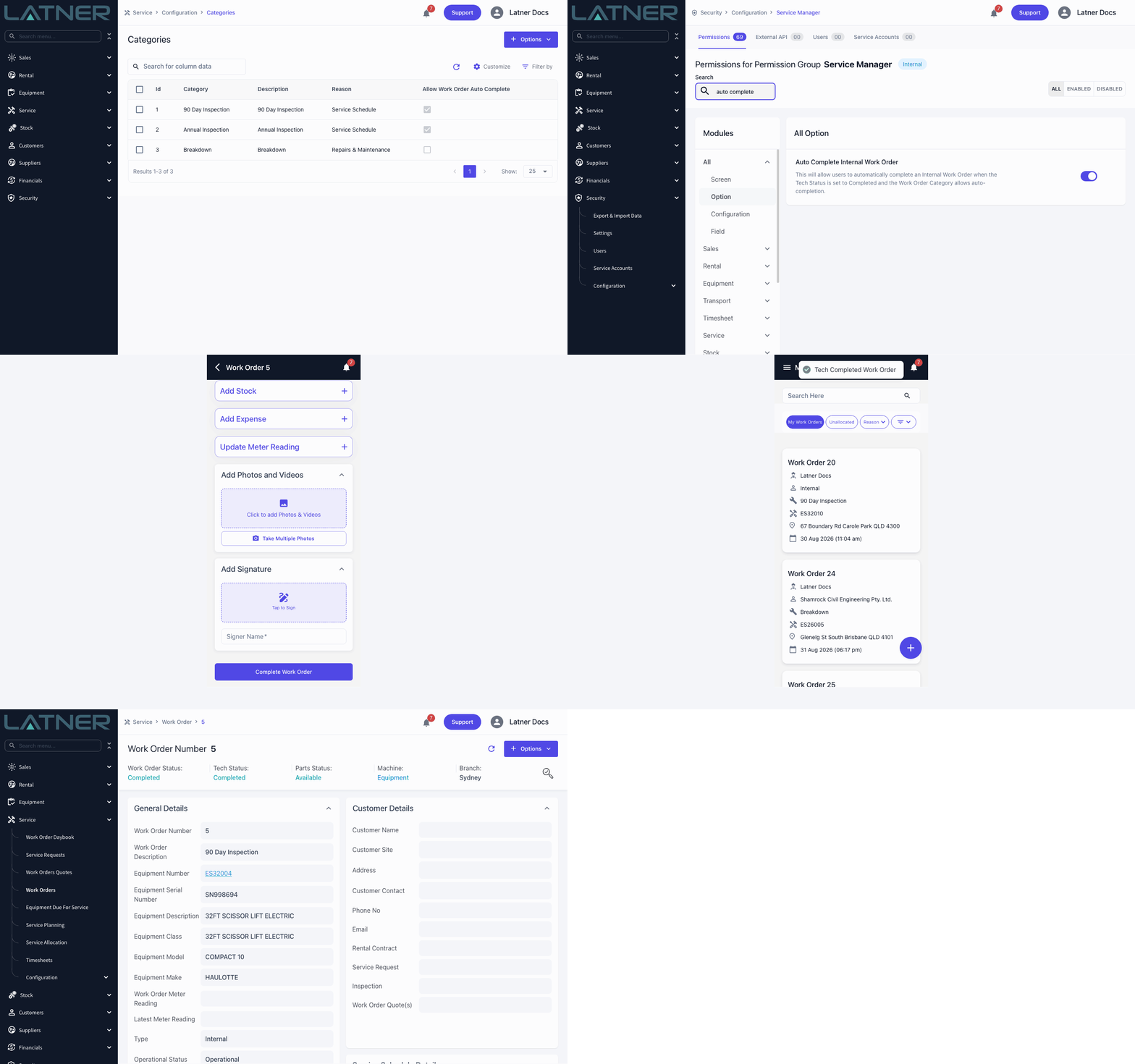
Experienced technicians can now close out their own internal work orders. When a tech sets their status to Completed on an internal work order, Latner can complete the work order for them on the spot - no more waiting for someone in the office to finish it off. You control it at two levels, so you decide exactly where it applies. A new Auto Complete Internal Work Order permission covers the who: give it to your senior techs and leave it off for apprentices. A new Allow Auto Complete option on each Work Order Category covers the what: routine inspections yes, breakdowns no. Both must be on for a work order to auto-complete. The usual completion checks still run, so a work order that isn't ready simply stays open, and if you require approval for failed checklists it still goes to Pending Approval instead.
Auto-Cc Yourself on Emails
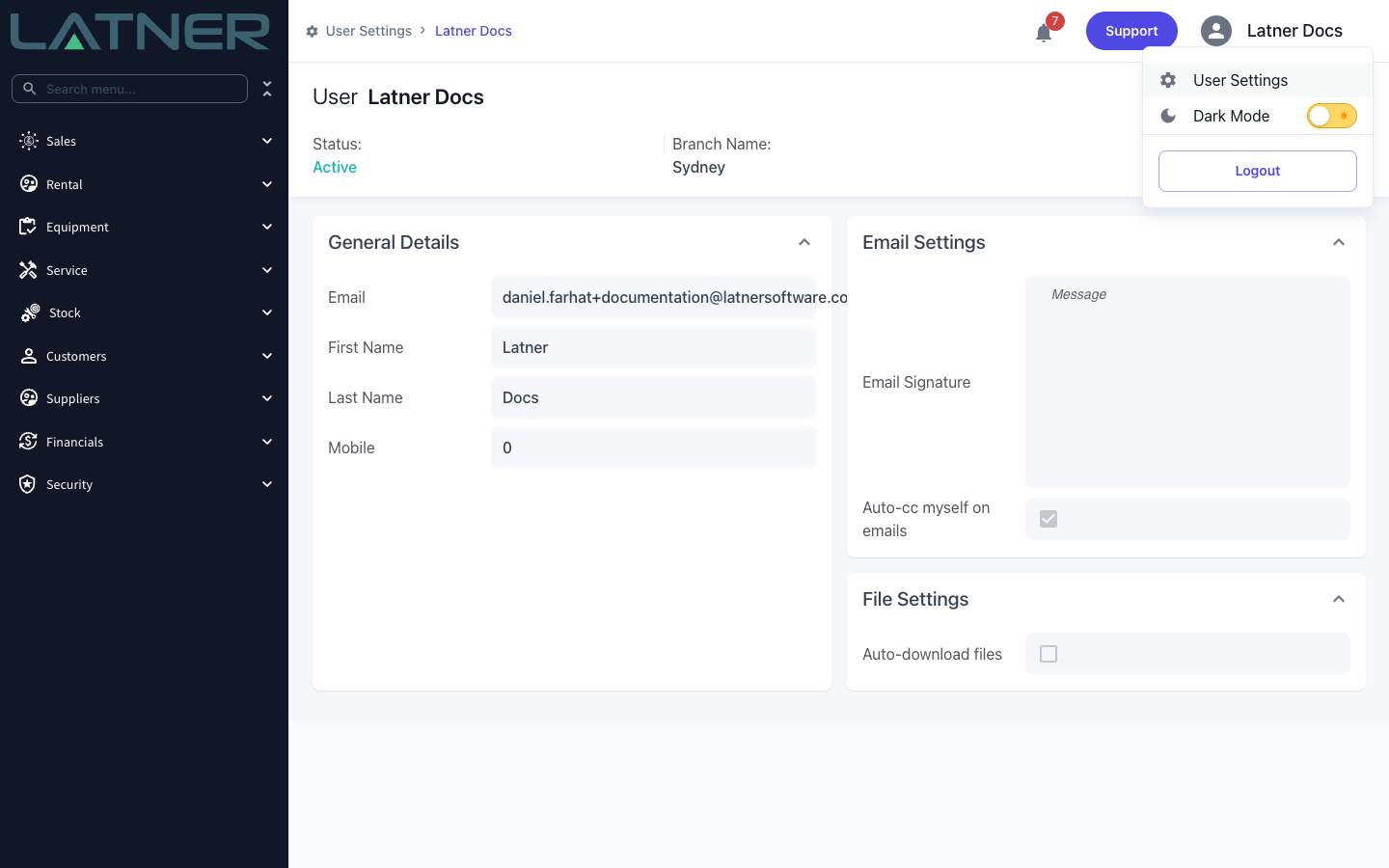
Until now, every email you sent from Latner pre-filled the Cc field with your own address unless your branch had a Cc address configured. You can now switch that off for yourself. The new Auto-cc myself on emails option sits in the Email Settings panel of your User Settings page - open the menu under your name in the top right and choose User Settings. It's on by default, so nothing changes until you untick it. Once it's off, the Cc field starts empty in every email dialog - rental quotes and contracts, invoices, credit notes, transport dockets, sales and purchase orders, work orders and more. Cc addresses your administrator has configured at branch level still pre-fill exactly as before.
Futile Sanitation Visits
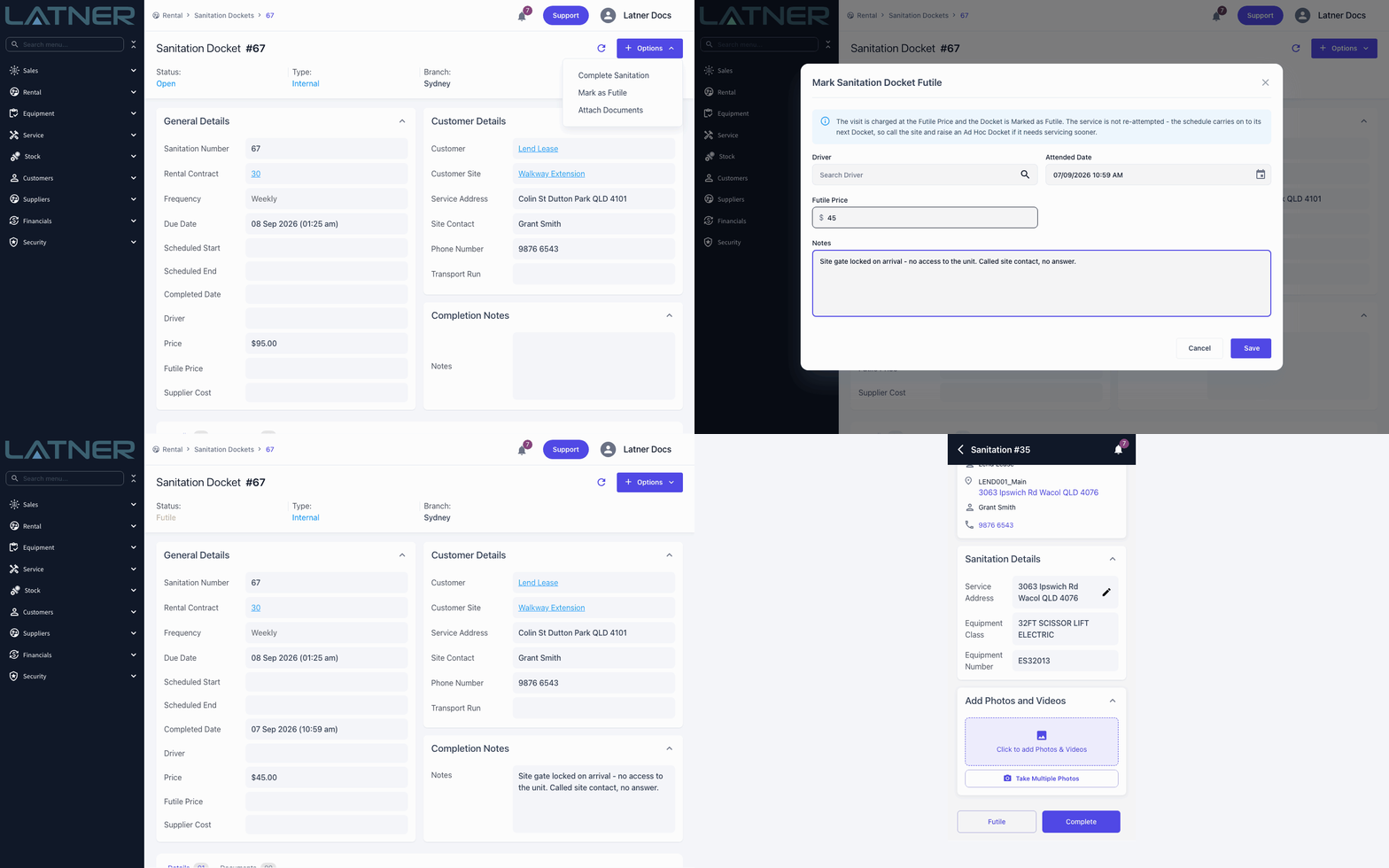
Sometimes the driver turns up and the service just can’t happen - the gate is locked, the unit is boxed in, nobody is on site. That wasted trip is now recorded and charged properly: on the sanitation docket choose Options › Mark as Futile (or tap Futile on the mobile docket), confirm the driver and attended date, and the docket finishes with a status of Futile instead of Completed. It’s charged at the Futile Price rather than the sanitation charge - set the default on your Rental Rates and sanitation lines, and override it for a one-off right in the dialog - and the line appears on the customer’s invoice labelled as a Futile Visit so it’s clear what they’re paying for. The schedule simply carries on to its next docket, so if the site needs servicing sooner, raise an Ad Hoc docket.
Contract Completion After Final Invoicing
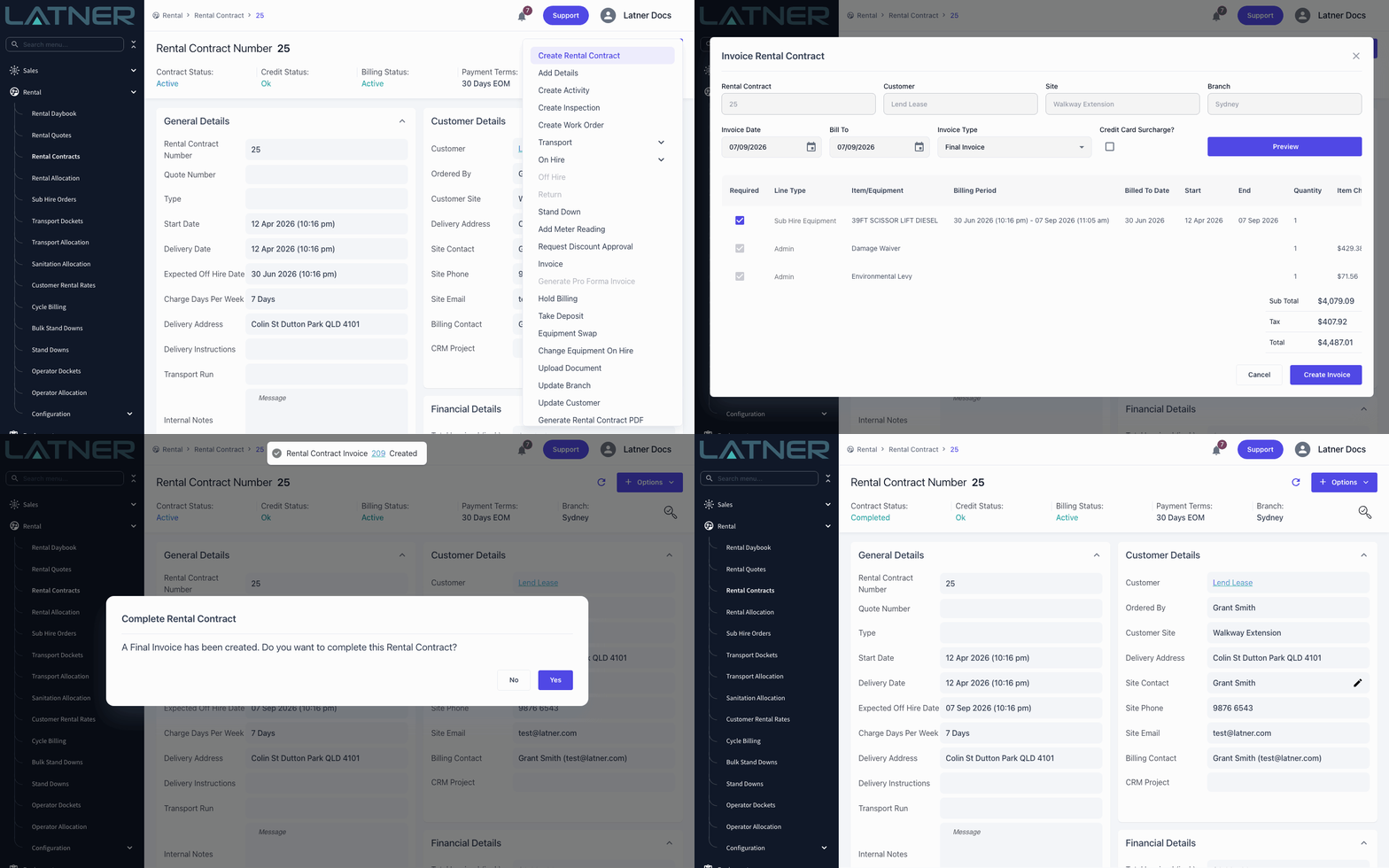
Raising the final invoice used to be the second-last step - you’d then head back to Options and complete the contract by hand. Now, when you create a Final Invoice from Options › Invoice on a rental contract whose equipment has all been returned, Latner asks whether you’d like to complete the contract there and then. Choose Yes and the contract moves to Completed on the spot; choose No and it stays active for you to finish later. The prompt only appears once every equipment line is back, so a contract with gear still on hire is never closed by accident.
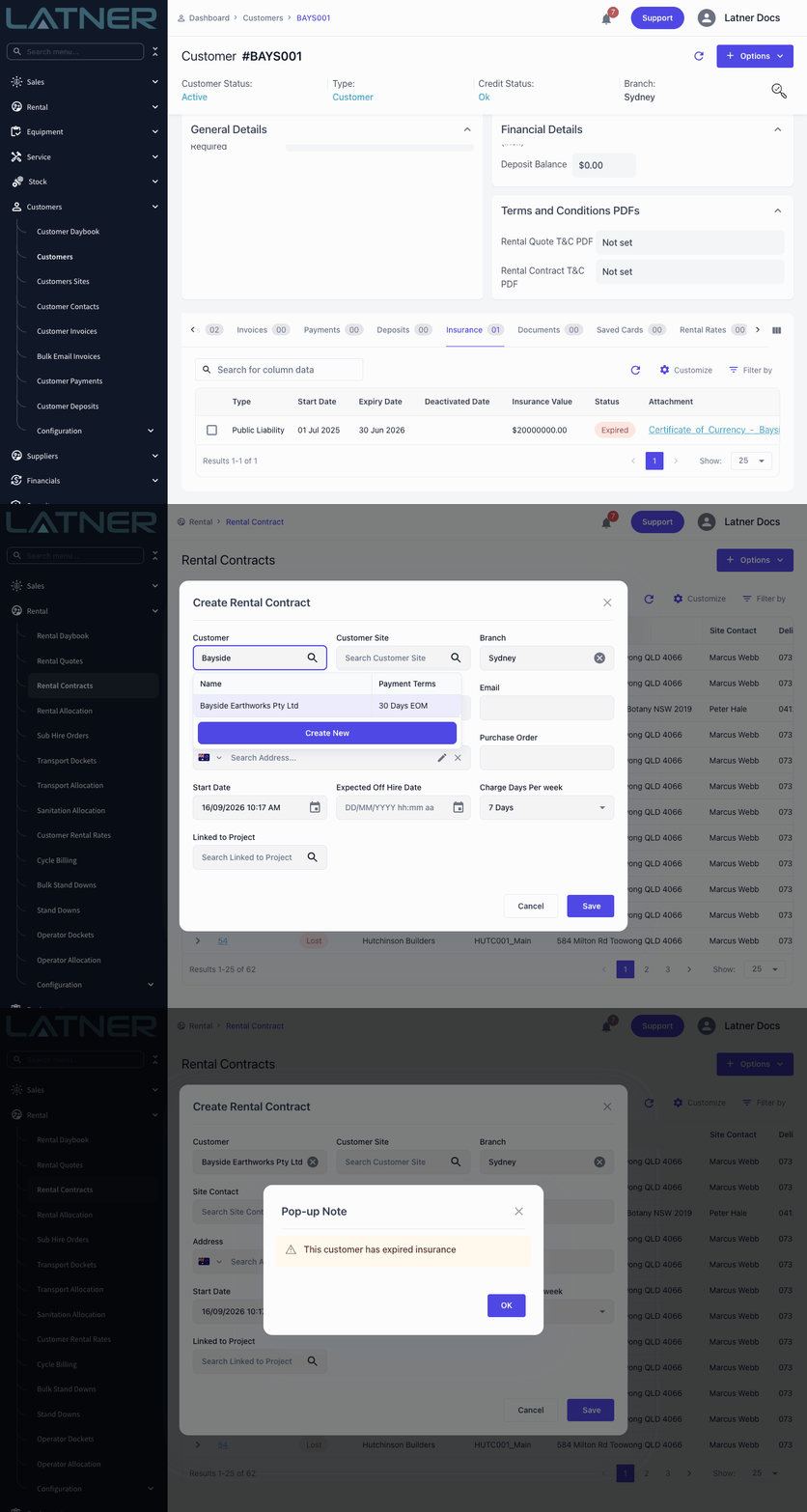
Expired Insurance Warnings
Hiring gear to a customer whose insurance has lapsed is something you'd rather know before the paperwork is signed. Latner now checks the Insurance tab the moment you pick a customer or supplier, and if a policy has passed its expiry date a Pop-up Note appears reading This customer has expired insurance (or This supplier has expired insurance), stacked with the credit hold warning and pop-up notes you already rely on. Customers are checked on Create Rental Quote, Create Rental Contract, Create Sales Order, Assign Customer and when changing the customer on a rental or a work order; suppliers on Create Purchase Order, Duplicate Purchase Order, sub-hire lines, transport dockets and external work orders. There's nothing to switch on - just keep each policy's Expiry Date current, and deactivate the old policy once it's been renewed, because it's the expired policy that triggers the warning.
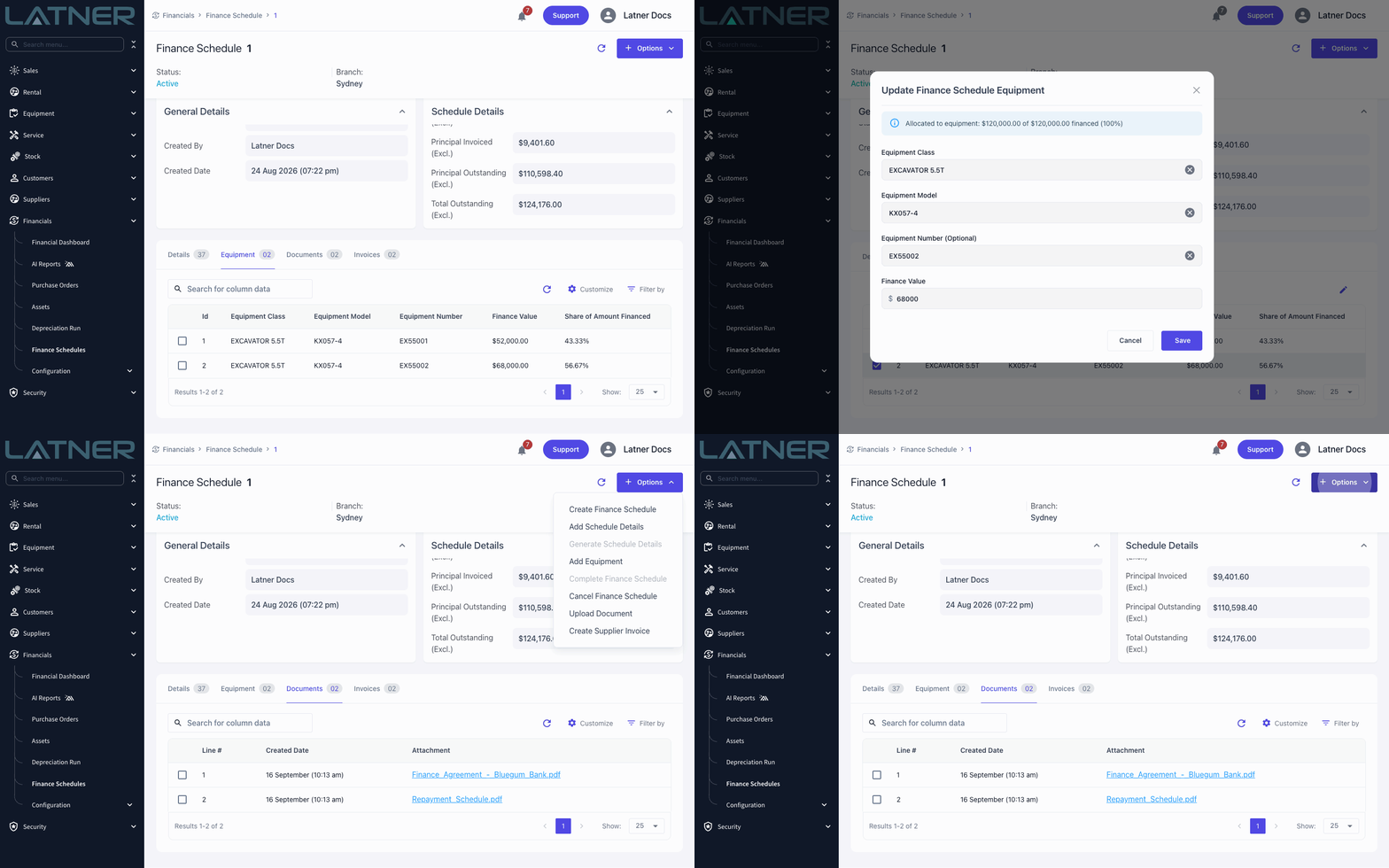
Finance Schedule Documents
Finance agreements, repayment schedules and payout letters now have a home in Latner. Every finance schedule has a new Documents tab - drop files straight onto it or use Options › Upload Document - so the paperwork sits beside the schedule it belongs to rather than in someone's inbox. Images and PDFs are accepted, each one can be previewed or downloaded from the tab, and anyone who can create finance schedules can upload and remove them. In the same update, the equipment on a schedule is now apportioned by a dollar Finance Value instead of a percentage: pick a machine and its purchase price is suggested for you, the dialog shows how much of the amount financed has been allocated so far, and the Share of Amount Financed column works out the percentage automatically. Existing schedules have been converted using each machine's recorded purchase price, so it's worth a quick look at the Equipment tab to confirm the split reads the way you expect.
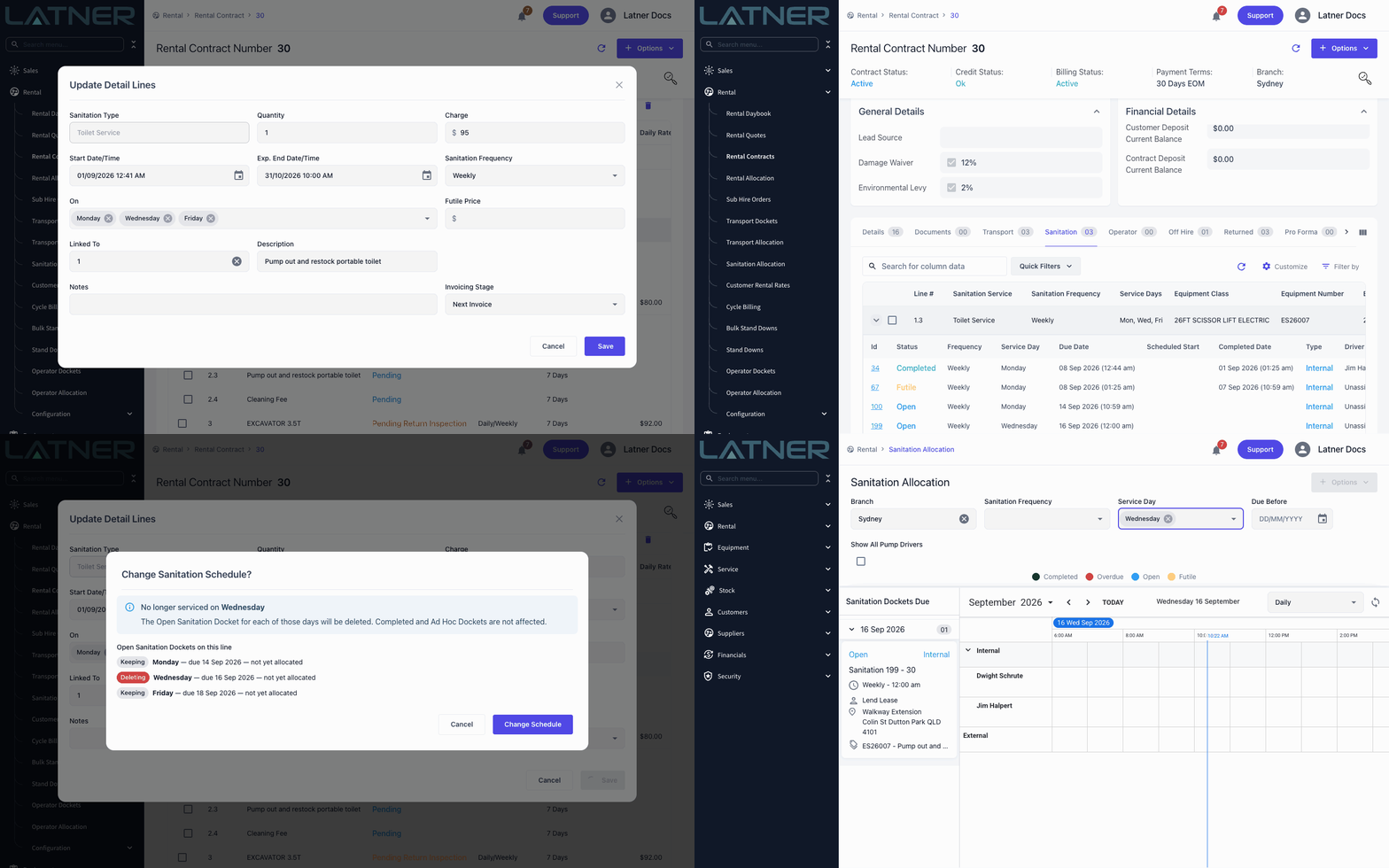
Sanitation Service Days
A weekly pump-out doesn't always mean once a week. Sanitation lines on rental quotes and contracts now have an On field beside Sanitation Frequency, so a Weekly line can be serviced on Monday, Wednesday and Friday, or a Fortnightly line on Tuesdays only - and you can set the same days on additional items and rental rate lines so they flow onto new contracts. Latner runs a separate docket chain for each day, shows the days as Service Days on the contract and each docket's Service Day on the Sanitation tab, and prints the full schedule on the quote and contract PDFs. Change the days on a live line and a Change Sanitation Schedule? prompt shows exactly which open dockets are kept and which are removed before you confirm, and the Sanitation Allocation board has a new Service Day filter for planning each day's run.
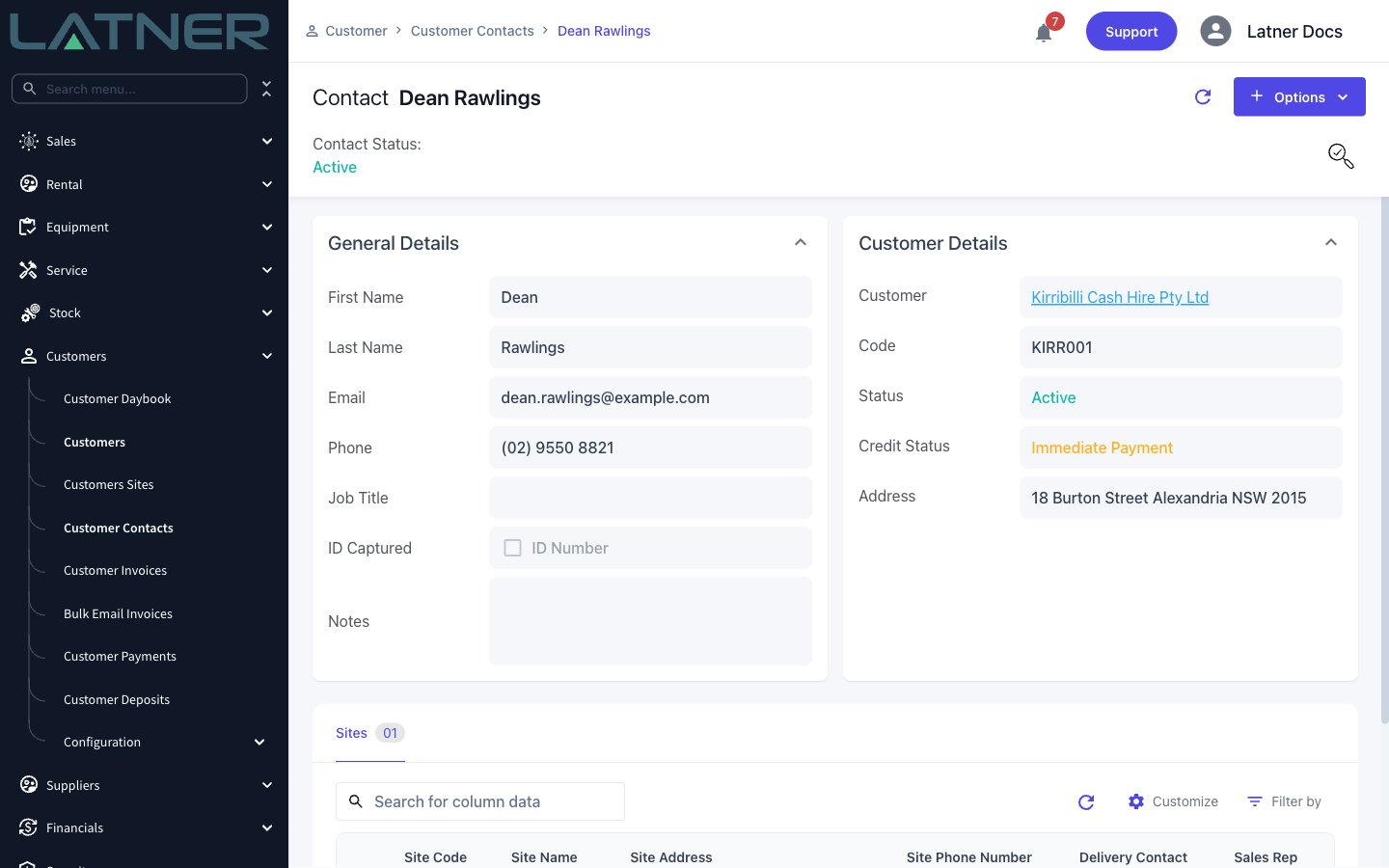
ID Details for Account Customers and Contacts
Recording a driver's licence or other ID used to be something you could only do for COD customers. Turn on Capture ID for Account Customers under Security › Settings and the ID Captured checkbox and ID Number field appear on your account customers as well, so anyone can see at a glance that a new account has been verified. The same two fields are now on every customer contact - in Create Contact on desktop and mobile and on the contact's details - and the contacts list shows an ID Captured column so you can spot who still needs checking. Contacts follow the same rule as their customer: always available for COD customers, and for account customers once the setting is on.
Depreciation on the Equipment Profitability Dashboard
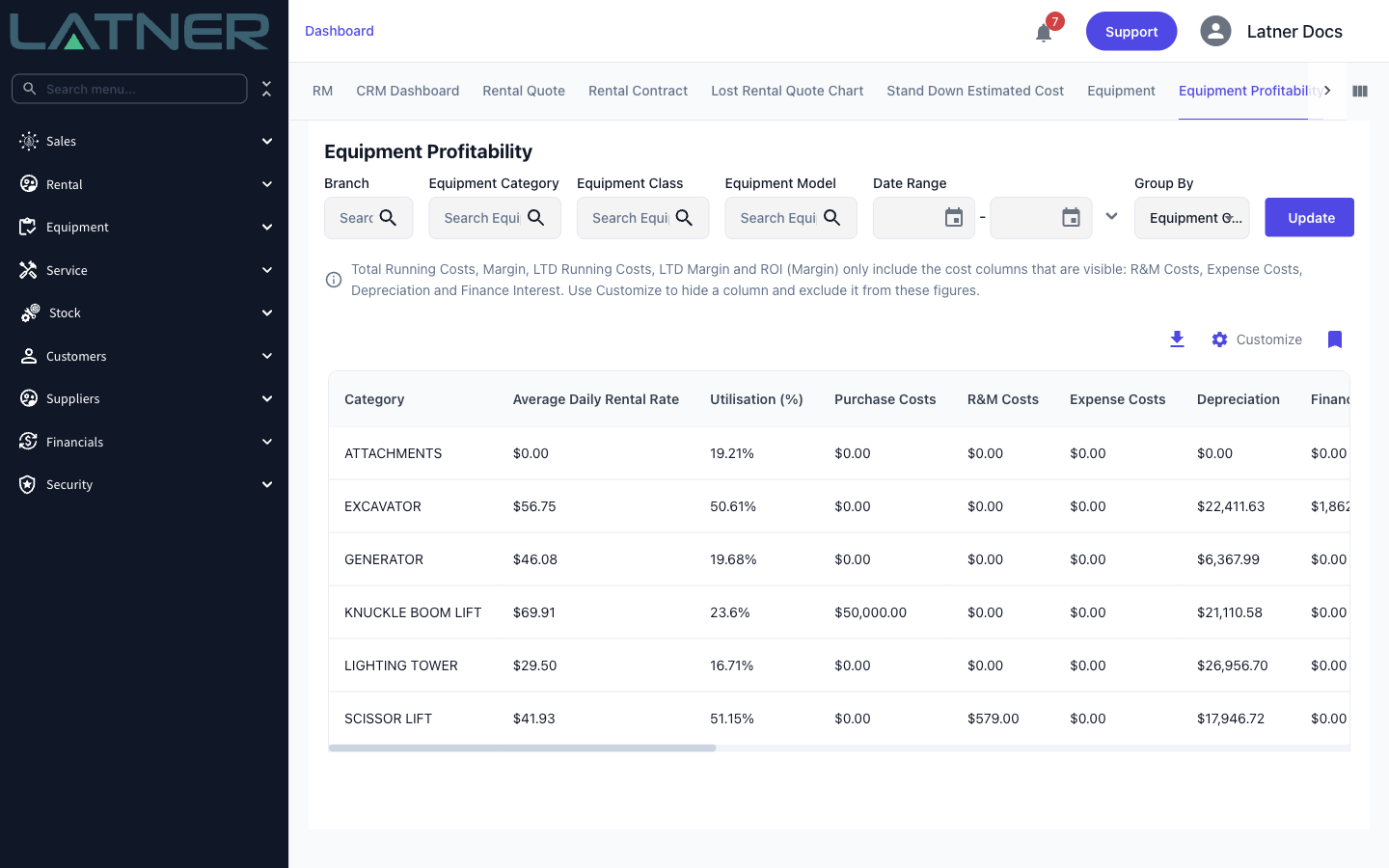
Running costs on the Equipment Profitability dashboard now include depreciation. New Depreciation and LTD Depreciation columns show each machine's depreciation for the period and over its lifetime, attributed to the branch that actually held the equipment - so a machine transferred mid-month has that month split between the two branches by the days each one held it. Total Running Costs, Margin, LTD Running Costs, LTD Margin and ROI (Margin) are now worked out from whichever cost columns you have showing: use Customize to hide Depreciation, R&M, Expenses or Finance Interest and the totals recalculate on the spot, your column choices are remembered, and the CSV download follows the same columns. Note that this branch split is for reporting - posted depreciation in your accounting integration still follows the asset's branch at the time of posting.
Other Updates & Improvements
-
Upload a Sales Order Cover PDF under Security › Settings › PDF Templates and it's added to the front of every generated and emailed Sales Order PDF, globally or per branch
-
Accounting integrations can now set revenue account codes per Equipment Number, with a machine's own code taking priority over its model, class and category codes
-
Revenue account codes can also vary by rental type - turn on Set Revenue Account Codes per Rental Type in your Xero or MYOB integration settings
-
The prompt after Save and Finish on a rental contract now offers Manual On Hire alongside Delivery and Customer Collection when manual on hire is enabled
-
Customer pop-up notes and the credit hold warning now appear when you select a customer on Create Customer Invoice, just as they do on a new rental contract
-
Credit notes raised from a rental contract or an invoice now inherit the Sales Rep
-
Signatures captured on mobile work orders, transport dockets and operator dockets now record a Signer Name, shown as Signed By and Signed Date on the desktop record and available to PDF templates
-
Manual timesheets can be deleted from the desktop Timesheets screen, and a new Manage Other Timesheets permission controls editing and deleting other people's
-
The mobile scanner now reads standard barcodes as well as QR codes, and you can scan a Stock Number when adding stock to a mobile work order
-
Sanitation dockets now carry their own Service Address, editable from desktop and mobile, and changing a contract's delivery address offers to update its open dockets too
-
Ad hoc sanitation dockets can be raised on a sanitation line of any frequency, not just Ad Hoc lines
-
AI Reports can now report on equipment movements, conversions, disposals and pre-starts
-
New External API endpoints for revenue and revenue forecasts, with External API permissions and Service Accounts managed from Permission Groups
-
Edit the description on any invoice or credit note line, even after the invoice has been completed or when the line came from a rental contract, sanitation docket or sales order
-
Create a new supplier, supplier site or supplier contact with Create New straight from the dropdowns on a purchase order
-
Customers, sites, contacts and other linked records now open as links from rental quote, rental contract, sub hire order, sales order and transport docket details
-
Work order and work order quote PDFs now show labour as decimal hours
-
Equipment class and model pages now list the models and equipment under them, and equipment, model and class pages show the Rental Rates that apply to them with a Source column telling you where each rate and service schedule is inherited from
-
Rental rate pages list the customers assigned to them, rental contracts have a new Supplier Invoices tab, an equipment's asset is a link from its financials, and users can be added to notification, purchase order approval and credit note approval groups from the group's own page
-
Rental contract and invoice lines now show an icon when a line carries a rate adjustment, a revenue split or accounting details, with the breakdown in a hover tooltip instead of having to open the line
-
Empty Documents, Photos and Insurance tabs now invite you to drag and drop files or click to browse, and tabs that already have files show a hint beside the search box
-
Purchase orders now have multiline External Notes and Internal Notes - internal notes never appear on the supplier's PDF - and line descriptions on purchase orders and supplier invoices can run over several lines
-
Generating an Equipment Service History report now lets you choose which Reasons to include, with a Service History Report - Default Reasons setting for your usual selection
-
Tick Force Timesheets on a Work Order Category and technicians can't set their status to Completed on those work orders until a timesheet has been added
-
Tick Use Parent Line Account Code on an Admin Charge such as Excess Hours to code its revenue to the parent equipment, sub hire or package line's account instead of the admin charge's own
-
The scheduled Long Range Revenue Forecast can now look up to 24 months ahead - set Long Range Forecast Months under Security › Settings
-
A new Exclude Pending Activation Equipment from Equipment Utilisation setting keeps machines that are still waiting to be activated out of your fleet size, so they no longer drag utilisation down
-
MYOB users can turn on Map COD Payment Terms to 0 Days Nett in their integration's payment settings so COD terms sync as a zero-day term that ages in receivables
-
Click a tab's name in Reorder/Hide Tabs to jump straight to that tab
-
Select multiple lines on a supplier invoice and delete them in one go
-
Rental lines with a pre-allocated operator now show in Operator Allocation
-
Plus a range of smaller fixes and performance improvements