
Minimum Hours Per Month is the rate type for metered equipment on a usage commitment: the customer pays for an agreed number of hours every month, and any hours the meter shows above that are charged at an excess rate.
Overview
Some machines earn their keep by the hour, not by the day. A customer who has committed to 160 hours a month on a loader wants to see 160 hours on the invoice in a quiet month and the real number in a busy one. That is exactly what this rate type does, using the equipment's meter readings.
-
Each month bills the Minimum Monthly Hours at the Hourly Rental Rate, prorated for a part month or a stand down.
-
Metered hours above the month's minimum bill at the Excess Hourly Rental Rate on a separate Additional Hours line.
-
Hours under the minimum still bill the minimum. There is no credit for under-use.
-
It is available on Fixed Pricing and Manual Pricing only - not on Daily/Weekly Pricing, Tiered Pricing or a Sub Hire supplier rate.
-
Minimum Charge, Max Daily Hours and Excess Hours Rate are hidden for this rate type, because it has its own minimum and its own excess.
Before You Begin
|
Requirement |
Where to Find It |
|---|---|
|
Allowed Rental Rate Types either empty or including Minimum Hours Per Month |
Security › Settings › Rental |
|
Default Charge Hours Per Day - pre-fills Hours per Day on new rates |
Security › Settings › Rental |
|
Metered equipment - the line must be for a single unit of equipment that has a meter |
The Equipment Class's meter type |
The Four Values
-
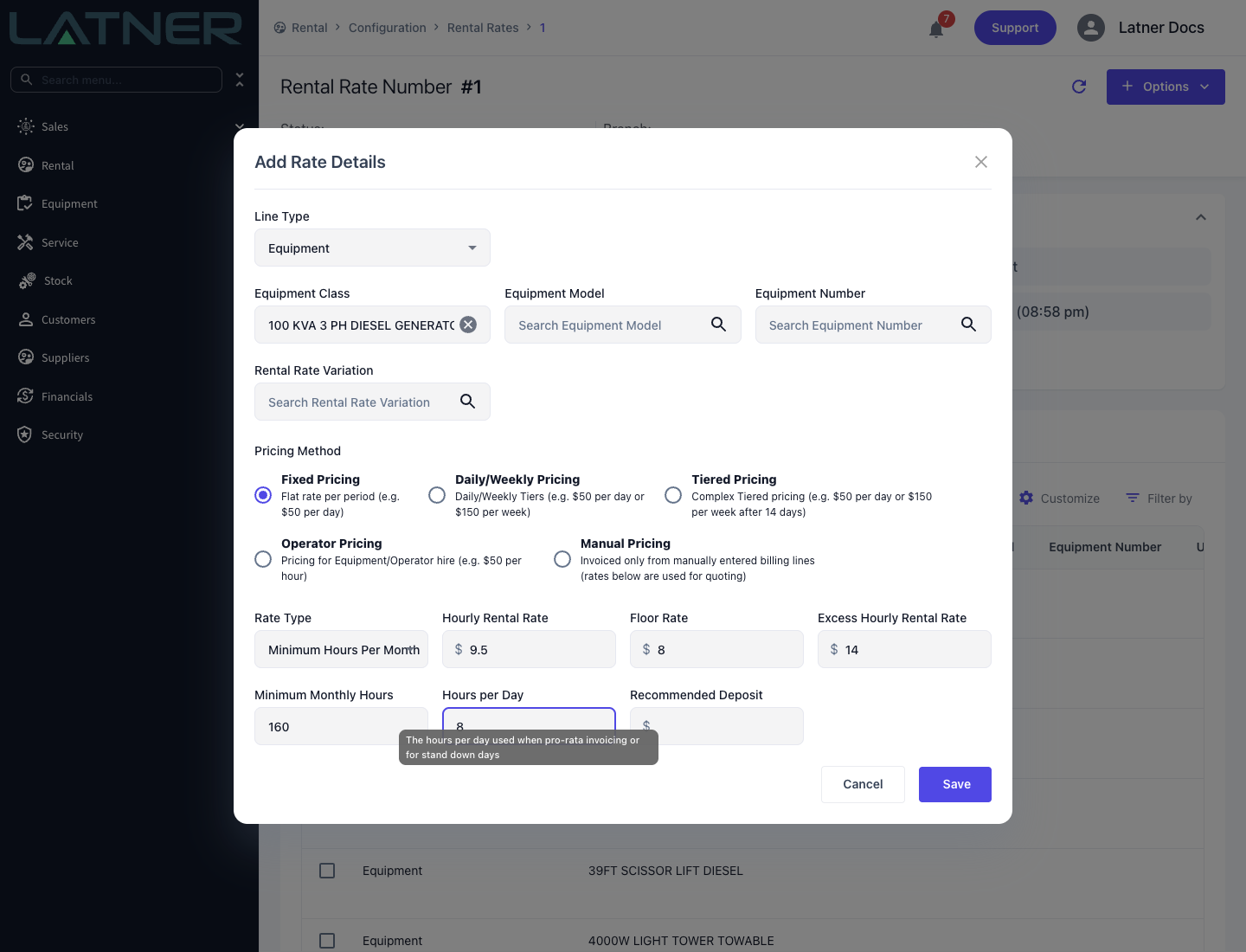
Hourly Rental Rate - the charge per hour of the monthly minimum.
-
Excess Hourly Rental Rate - the charge per hour above the minimum.
-
Minimum Monthly Hours - the hours the customer has committed to each month. Required.
-
Hours per Day - the hours per day used when pro-rata invoicing or for stand down days. Required, and seeded from Default Charge Hours Per Day.
How It Charges
The first billing month runs from the on hire date to the end of that calendar month. Every month after that is a calendar month, 1st to last day, and the final month ends at the off hire. Every invoice recalculates the whole hire month by month and subtracts what has already been invoiced, so a part month billed on a progress invoice is topped up on the next one.
The month's minimum
-
A whole calendar month with nothing stood down bills Minimum Monthly Hours exactly.
-
A part month, or any month with a stand down in it, bills (chargeable days on hire - stand down days) x Hours per Day, capped at Minimum Monthly Hours.
-
Chargeable days follow the line's Charge Days Per Week. Stand down days are weighted by the stand down's Discount % - four days at 50% count as 2 - and only Completed stand downs count.
-
The stand down is not subtracted from the minimum. Latner does not calculate Minimum Monthly Hours - (stand down days x Hours per Day).
The excess
For each month, Latner takes the latest meter reading in that month (the return meter reading for the final month) and subtracts the reading at the start of the month. Hours above the month's minimum are excess. Where no reading was taken in a month, Latner assumes exactly the minimum was used and carries the reading forward, so the next real reading picks up the accumulated usage.
Worked example
A loader at Hourly Rental Rate $95.00, Excess Hourly Rental Rate $110.00, Minimum Monthly Hours 160 and Hours per Day 8, on a 5 Days contract. The month has 22 chargeable days.
-
Quiet month - the meter shows 131 hours. The minimum bills: 160 x $95.00 = $15,200.00, and there is no Additional Hours line.
-
Busy month - the meter shows 182 hours. 160 x $95.00 = $15,200.00 on the rental line, plus 22 x $110.00 = $2,420.00 on an Additional Hours line.
-
A month with a 4 day stand down at 100% - the minimum is (22 - 4) x 8 = 144 hours, so 144 x $95.00 = $13,680.00. It is not 160 - 32 = 128. Metered hours above 144 are excess.
-
A first month starting with 12 chargeable days left - 12 x 8 = 96 hours, so 96 x $95.00 = $9,120.00.
Because of the cap, a short stand down can leave the bill unchanged. With 22 chargeable days, 22 x 8 = 176 hours is already over the 160 hour minimum, so one or two stand down days still bill 160. The minimum only starts to drop from the third day. Set Hours per Day to what the customer actually committed to per day, because it decides both part months and stand downs.
On the Invoice
-
Rate Type - Minimum Hours Per Month. Rental Rate - the Hourly Rental Rate.
-
Billable Hours - the minimum hours this invoice bills (shown as Billable Units on the Create Invoice screen, for example 160 Hours).
-
Calc. Daily Rate and Adj. Daily Rate - left blank. The charge is hours, not days times a daily rate.
-
Additional Hours - <equipment number> - a separate admin line per month with excess: quantity is the excess hours, unit price the Excess Hourly Rental Rate. A later correction appears as Additional Hours Adjustment, and a credit as Refund Additional Hours.
Once a line has been invoiced it cannot change to or from Minimum Hours Per Month. A Rental Rate Adjustment on it can only move to a new Minimum Hours Per Month rate, and must take effect on the 1st of a month.