
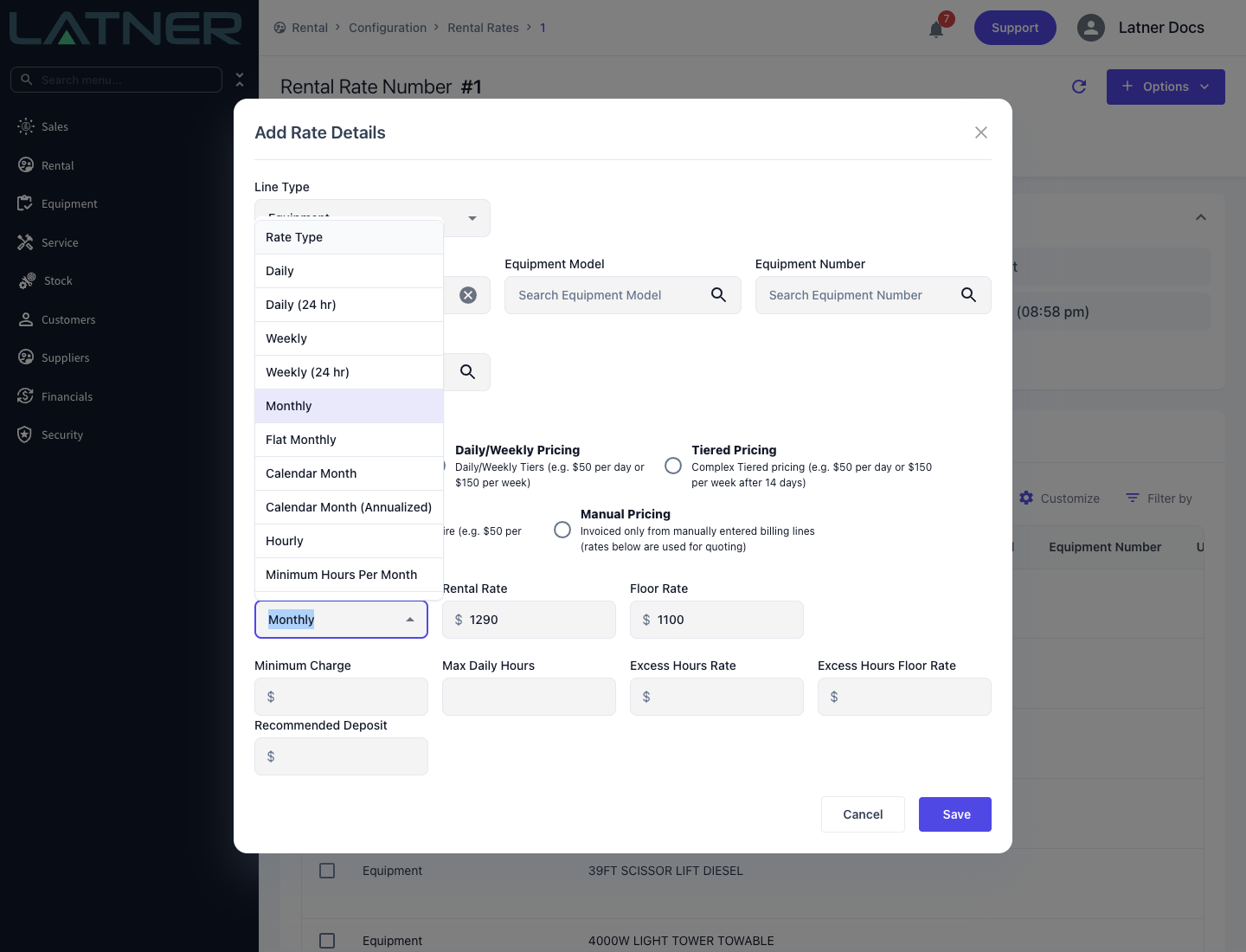
Rate Types are the units a rental rate is expressed in, and each one has its own way of turning a rate into a charge - this page is the reference for all eleven.
Overview
A Pricing Method decides which rate Latner bills; a Rate Type decides how that rate becomes money. Getting the rate type right matters more than the number next to it, because the rate type is what decides whether a month means 30 days, the real calendar month, or a twelfth of a year.
-
Every rate row has exactly one Rate Type, chosen from a dropdown filtered by the Allowed Rental Rate Types setting and by the pricing method.
-
Most rate types work by converting the rate into a daily equivalent and multiplying by the chargeable days. Charge Days Per Week is the divisor.
-
Four of them - Flat Monthly, Calendar Month, Calendar Month (Annualized) and Minimum Hours Per Month - have no daily equivalent, so no daily rate is shown against their invoice lines.
-
The monthly rate types handle a part month differently. Only Flat Monthly never prorates; the others give you pro rata (pro-rata) billing for a partial month in their own way - see Pro Rata Billing for a Partial Month below.
-
Flat Monthly and Minimum Hours Per Month can't be swapped to or from another rate type once a line has been invoiced on them.
The Day Based Rate Types
Daily
Charges the rate for every chargeable day. The daily equivalent is the rate itself. Best for short hires where the customer wants a clear day-by-day cost.
Daily (24 hr)
The same rate, but billing days are counted as full 24 hour blocks from the hire start time rather than as calendar days. A machine picked up at 2pm Monday and returned at 1pm Tuesday is one day, not two. Use it where the exact time of day genuinely matters.
Weekly
Charges per chargeable week. The daily equivalent is the rate divided by Charge Days Per Week, so a $400 weekly rate is $80 a day on 5 Days and $57.14 a day on 7 Days.
Weekly (24 hr)
As Weekly, but the billing week runs as continuous seven-day windows from the hire start time.
The 24 hour rate types work with the 24 hr Rental Rate Grace Period (Minutes) setting. On the invoice that follows an off hire, a return that has run past the 24 hour block by less than the grace period does not attract the extra day. Set it in Security › Settings › Rental.
The Month Based Rate Types
The three monthly rate types are the ones most often mixed up, and they charge genuinely different amounts for the same hire.
Monthly
Treats every month as a flat 30 chargeable days. The daily equivalent is the rate divided by 30, and a shorter hire simply bills fewer days at that figure, so a partial month is prorated at the rate divided by 30 for each chargeable day on hire. Simple and predictable, at the cost of not lining up with the real calendar: on 7 Days, a whole 31 day month bills 31/30 of the rate.
Flat Monthly
Charges the full rate for each month from the hire start date through to the day before the same date the following month, whatever falls in between. It ignores Charge Days Per Week and has no daily equivalent, so a Flat Monthly line shows no daily rate on its invoice. A $5,000 Flat Monthly rate starting on the 12th bills $5,000 on every 12th, for as long as the hire runs.
Flat Monthly never prorates. A hire that starts mid-month bills the full rate from its start date, and a hire that ends part way through a month still pays for that whole month - only months that have not started yet are credited back when it goes off hire early. Stand downs make no difference to it either.
Calendar Month
Prorates the rate against the real month. Latner works out how many chargeable days the whole month contains and how many of them fall inside the hire, then charges that fraction of the monthly rate. A whole month with nothing stood down bills the full rate; a part month bills its share. February costs the same as March for a full month, but a fortnight in February costs more per day than a fortnight in March.
How the share is counted depends on Charge Days Per Week. On 7 Days it is calendar days on hire over the days in that month. On anything else it is chargeable days on hire over the chargeable days in that month - a $1,000 Calendar Month rate on 5 Days from 16 to 30 September 2024 covers 11 of September's 21 chargeable days, so it bills $1,000 x 11 / 21 = $523.81. Stand down days come off the days on hire, so a stand down prorates even an otherwise whole month.
Calendar Month (Annualized)
Spreads the annual cost - the monthly rate times twelve - evenly across all 365 days of the year. It deliberately ignores Charge Days Per Week, so weekends and public holidays are charged like any other day. Use it where the customer wants one consistent daily value across the whole year. A part month bills the monthly rate x 12 x the days on hire / 365.
The Hour Based Rate Types
Hourly
Prices from an Hourly Rental Rate with an Overtime Rate and a Minimum Hours value. On a quote the charge is the hourly rate multiplied by the minimum hours. Hourly tiers cannot be mixed with other rate types on a quote or contract.
Minimum Hours Per Month
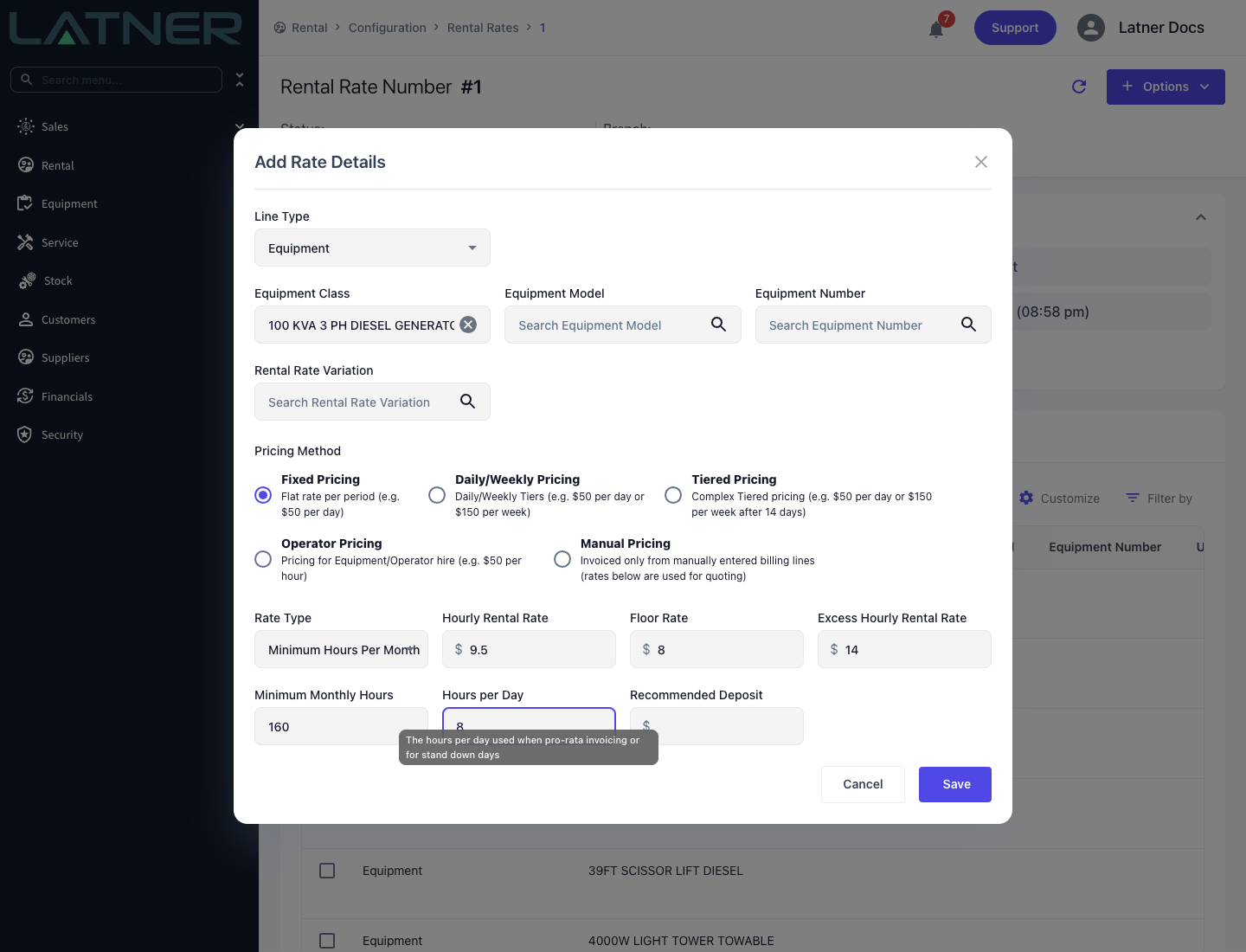
The rate type for equipment where usage varies but the customer has committed to a minimum. It uses four values:
-
Hourly Rental Rate - the charge per hour of committed usage.
-
Excess Hourly Rental Rate - the charge per hour above the commitment. Required.
-
Minimum Monthly Hours - the committed hours per month. Required.
-
Hours per Day - used to pro rata a part month and to value stand down days. Required, and seeded from the Default Charge Hours Per Day setting.
Each month Latner charges the minimum monthly hours at the hourly rate, prorating the minimum down for a part month or for stand down days. It then compares the equipment's meter readings for that month against the minimum and charges any excess hours at the excess rate, as a separate Additional Hours line on the invoice. Where no meter reading was taken in a month, Latner assumes exactly the minimum was used and carries the reading forward, so the next real reading picks up the accumulated usage.
How Part Months and Stand Downs Are Prorated
Minimum Hours Per Month bills by calendar month - the 1st to the last day - whatever date the hire started. A whole month with nothing stood down bills Minimum Monthly Hours as it stands. For a partial month, or any month with a stand down in it, Latner works the minimum out from the days instead:
Billed minimum hours = (chargeable days on hire in the month - stand down days) x Hours per Day, capped at Minimum Monthly Hours.
-
Chargeable days are the days that match the line's Charge Days Per Week - Monday to Friday on 5 Days, every day on 7 Days. Public holidays are not taken out automatically; record them as a stand down.
-
Stand down days are the chargeable days inside a Completed stand down, weighted by its Discount %. Four days at 100% count as 4; four days at 50% count as 2.
-
The stand down is not subtracted from the minimum. Latner does not calculate Minimum Monthly Hours - (stand down days x Hours per Day).
The billed minimum hours are charged at the Hourly Rental Rate. Metered hours above the billed minimum are charged at the Excess Hourly Rental Rate on the Additional Hours line. Metered hours below it still bill the minimum - there is no credit for under-use.
Example - a month with a stand down. Minimum Monthly Hours is 160, Hours per Day is 8, and the month has 22 chargeable days on 5 Days. The customer stands the machine down for 4 days at 100%.
-
Billed minimum hours = (22 - 4) x 8 = 144 hours at the Hourly Rental Rate.
-
It is not 160 - (4 x 8) = 128. Getting down to 128 hours would take 6 stand down days: (22 - 6) x 8 = 128.
-
If the meter shows 170 hours for the month, the 26 hours above 144 bill at the Excess Hourly Rental Rate.
Example - a partial month. Same rates, but the hire starts on a Wednesday with 12 chargeable days left in the month.
-
Billed minimum hours = 12 x 8 = 96 hours.
-
With a 2 day stand down in those 12 days, it is (12 - 2) x 8 = 80 hours.
-
Any metered hours above the billed minimum - 96 or 80 - bill at the Excess Hourly Rental Rate.
Because of the cap, a short stand down can leave the bill unchanged. In the example above, 22 chargeable days x 8 hours is 176, which is already over the 160 hour minimum. A 1 day stand down gives 168 and a 2 day stand down gives 160, so both still bill the full 160 hours. The minimum only starts to drop from the third stand down day. Set Hours per Day to what the customer actually committed to per day, because it decides both partial months and stand downs.
Operator
The fixed rate type on an Operator Pricing row. It is not chosen from the dropdown in normal use and does not bill from a rate at all - see Operator Pricing.
Checking a Line's Rate Type
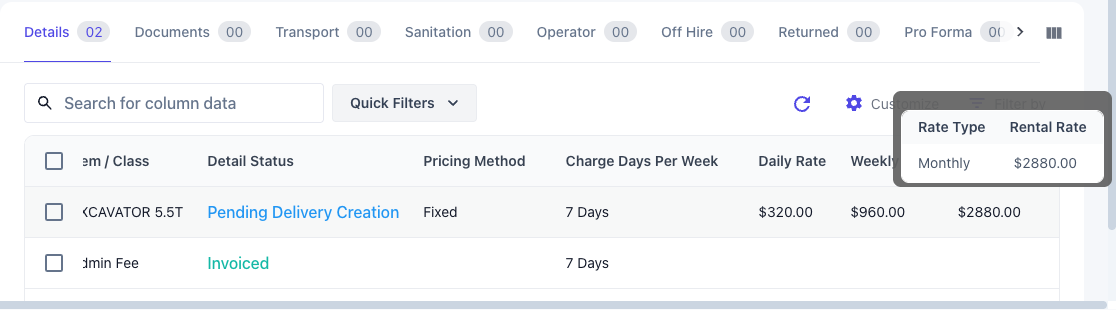
The rental contract's Details tab has no rate type column. Each rate column covers a group of rate types: Monthly Rate covers Monthly, Flat Monthly, Calendar Month and Calendar Month (Annualized), and Hourly Rate covers Hourly and Minimum Hours Per Month. To see exactly which one a line is on:
-
Hover over the rate on the Details tab. The pop-up lists each Rate Type on the line with its Rental Rate. If the column you need isn't showing, turn it on from View Columns.
-
Edit the line and check the Rate Type on the Customer Rental Rates tab of the Update Detail Lines form.
-
After invoicing, the Invoices tab on the contract shows the Rate Type each invoice line was billed on.
Changing a Line's Rate Type
Until a line has been invoiced, you can change its Rate Type by editing the line, including to or from Flat Monthly or Minimum Hours Per Month. Once it has been invoiced, its rate details lock (Cannot change Rate Details after invoicing), and the only way to change the rate is Rate Adjustment on the line - see How to Make a Rental Rate Adjustment.
A rate adjustment can't move a line to or from Flat Monthly or Minimum Hours Per Month. A line on either of them can only be adjusted to a new rate of the same type, and no other line can be adjusted onto them, because neither can reconcile what has already been billed against another type's maths. Minimum Hours Per Month adjustments also have to take effect on the 1st of a month.
When No Rate Type Fits the Deal
Some deals don't follow any rate type's maths - milestone payments, a negotiated schedule, or a part month priced in a way none of the types above calculate. For those, put the line on the Manual Pricing pricing method and bill it with Manual Billing Lines. Manual Pricing turns off rate-based billing for that line, so it invoices only the amounts you enter. The rates on it are still used for quoting. See How to Use Manual Billing Lines on a Rental Contract.
Which Pricing Methods Allow Which Rate Types
-
Fixed Pricing and Manual Pricing - every rate type.
-
Daily/Weekly Pricing - Daily, Daily (24 hr), Weekly and Weekly (24 hr) only, with the daily type in the first row and the weekly type in the second.
-
Tiered Pricing - everything except Flat Monthly, Calendar Month, Calendar Month (Annualized) and Minimum Hours Per Month.
-
Operator Pricing - Operator only.
-
Sub Hire supplier rates - no 24 hour rate types and no Minimum Hours Per Month.