
Tiered Pricing lets one rate row carry as many rates as you like, each unlocked by a Days on Rent threshold, so the effective rate steps down as a hire runs longer.
Overview
Tiered Pricing is the general case that Daily/Weekly is a special case of. Instead of two rates it takes any number, and instead of Latner deciding when a rate becomes relevant, you tell it - a daily rate from day one, a weekly rate from day seven, a monthly rate from day thirty, and a long-term rate from day ninety if that is how you sell.
-
Every tier has a Days on Rent value, a Rate Type and a Rental Rate. The first tier must be Days on Rent 1.
-
Days on Rent values must be unique - you cannot have two tiers starting on the same day.
-
A tier only becomes eligible once the hire reaches its Days on Rent. Latner then bills whichever eligible tier is cheapest.
-
Once a tier is selected, its Days on Rent is the minimum billed. A tier that starts at 7 days always charges at least 7 days.
-
Flat Monthly, Calendar Month, Calendar Month (Annualized) and Minimum Hours Per Month are not available as tier rate types - their billing periods do not fit a day threshold model.
-
On a quote or contract, Hourly tiers cannot be mixed with other rate types, and 24 hour tiers cannot be mixed with non-24 hour ones.
Before You Begin
|
Requirement |
Where to Find It |
|---|---|
|
Rental Rates configuration screen permission |
Security › Configuration › Permission Groups › Rental › Configuration |
|
Allowed Pricing Methods either empty or including Tiered |
Security › Settings › Rental |
|
Allowed Rental Rate Types covering the rate types you want as tiers, if the setting is populated |
Security › Settings › Rental |
Tiered Pricing is not offered on the supplier side of a Sub Hire rate in the same shape as the customer side - a sub hire supplier rate always bills at a rate, and 24 hour rate types and Minimum Hours Per Month are not supported there at all.
Setting Up a Tiered Rate
Step 1 - Add a rate row
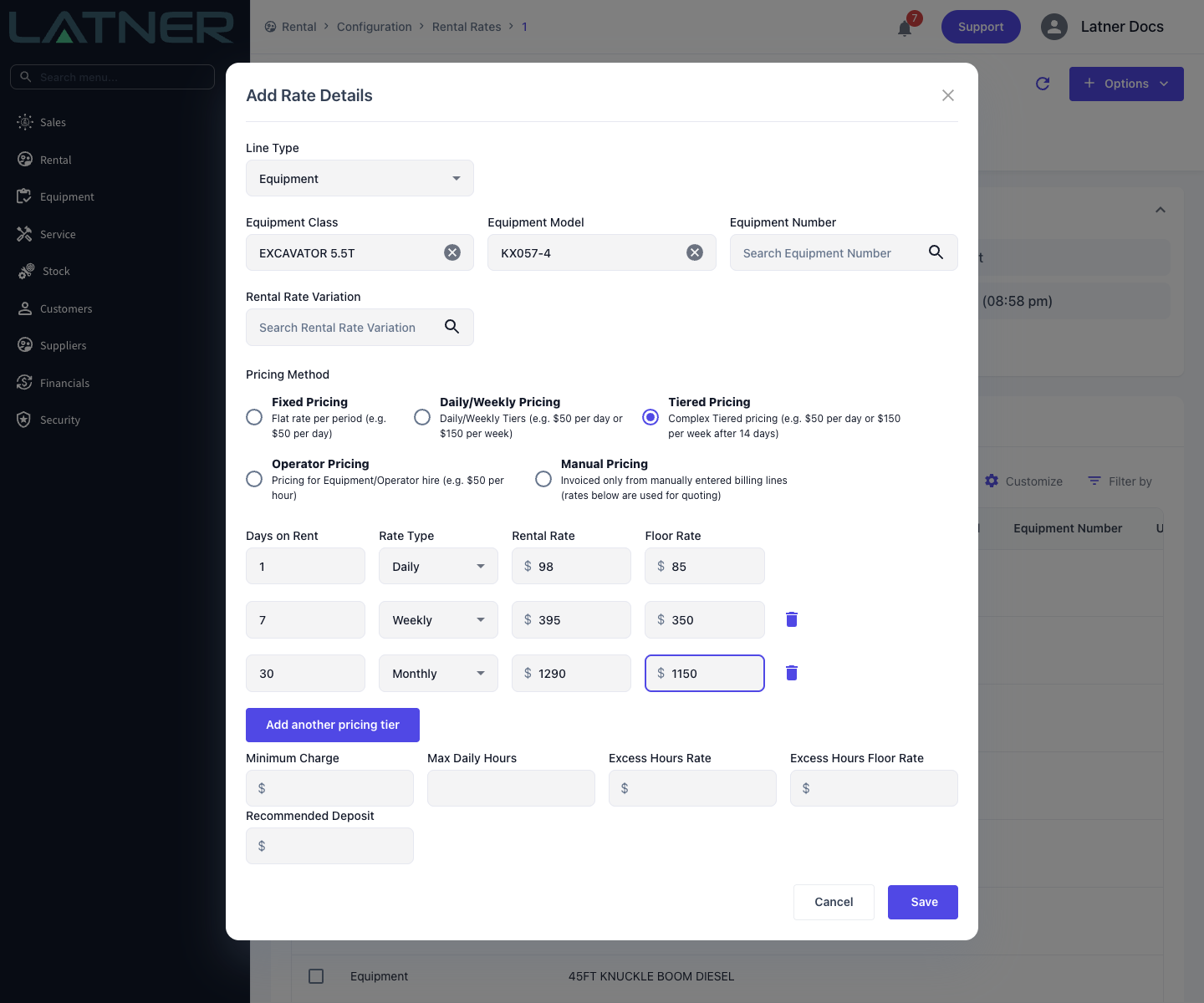
From Rental › Configuration › Rental Rates, open the rate book and choose Options › Add Rate Details. Pick the Line Type, then the Equipment Class and, if the tiers apply to one model or unit only, the Equipment Model or Equipment Number.
Step 2 - Select Tiered Pricing
Choose Tiered Pricing. A single tier appears, pre-filled with Days on Rent of 1.
Step 3 - Enter the first tier
Leave Days on Rent at 1 - Latner requires the first tier to start on day one - then set the Rate Type, the Rental Rate and, if you use them, the Floor Rate.
Step 4 - Add the remaining tiers
Click Add another pricing tier for each additional rate and fill in its Days on Rent, Rate Type and Rental Rate. Use the bin icon beside a tier to remove it. There is no limit on how many tiers a row can carry.
Step 5 - Save
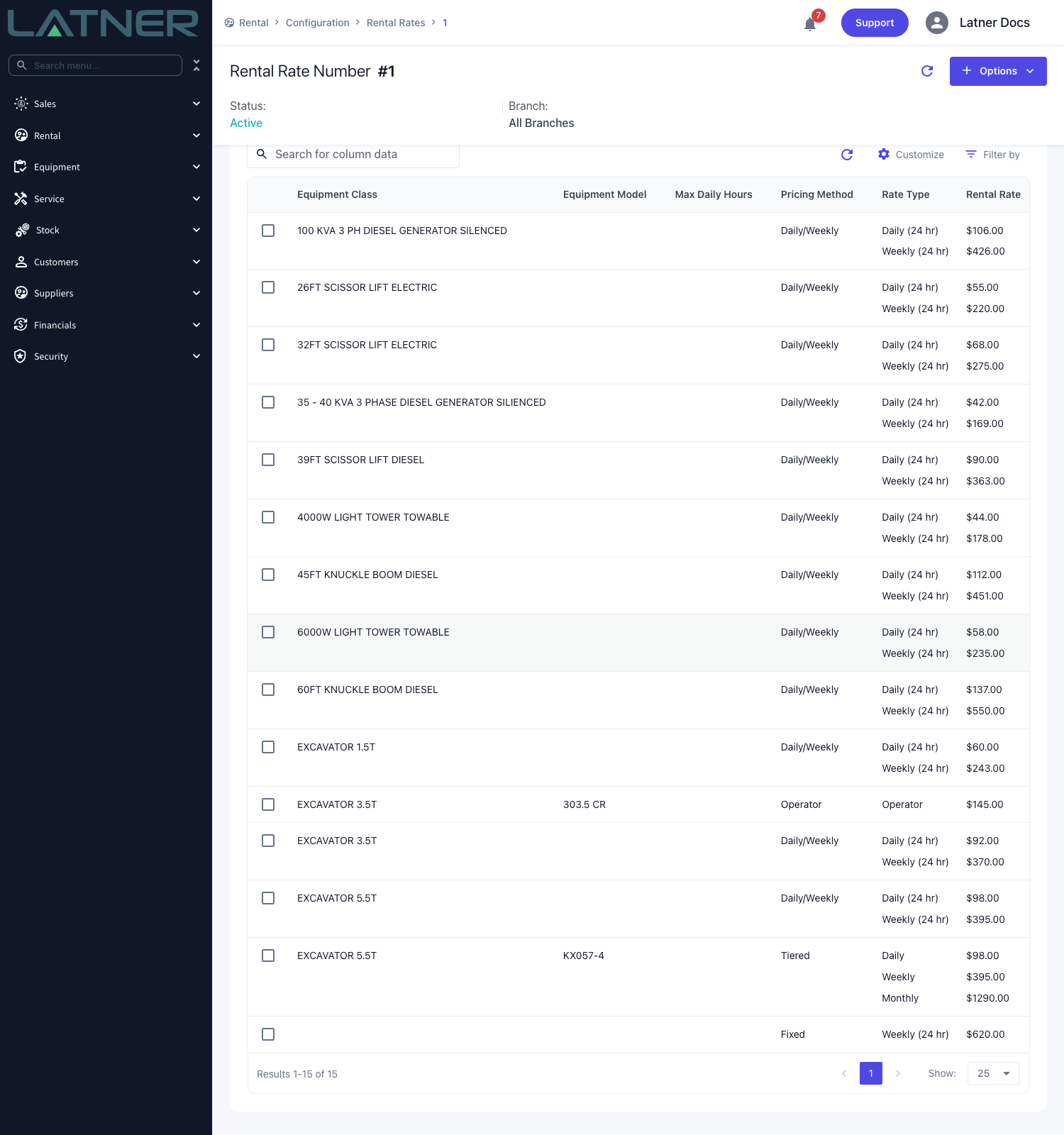
Click Save. All the tiers live in the one rate book row, stacked in the Rate Type and Rental Rate columns.
How Latner Chooses a Tier
At every invoice Latner looks at how many days the equipment has been on rent and works through the tiers:
-
Latner walks the tiers in Days on Rent order. Once days on rent reaches a tier's Days on Rent, that tier replaces the ones before it.
-
It also looks one tier ahead: if the current tier's daily equivalent x the actual days on rent costs more than the next tier's daily equivalent x that tier's Days on Rent, it moves to the next tier early.
-
Daily equivalents use Charge Days Per Week, and days on rent are counted on chargeable days from the start of the hire, less stand downs.
-
The chosen tier's Days on Rent becomes the minimum number of days billed.
Because the comparison runs at every invoice and reconciles against what has already been billed, a hire that runs into a cheaper tier only ever gets charged the difference.
Worked example
An excavator on Tiered Pricing with Charge Days Per Week of 5 Days:
-
Tier 1 - Days on Rent 1, Daily $50.00 (daily equivalent $50.00)
-
Tier 2 - Days on Rent 8, Weekly $180.00 (daily equivalent $180.00 / 5 = $36.00)
Running the hire out day by day:
-
Days 1 to 5 - only tier 1 is eligible, so the charge climbs $50.00, $100.00, $150.00, $200.00, $250.00.
-
Day 6 - tier 2 becomes worth considering: committing to it costs $36.00 x 8 = $288.00, against $50.00 x 6 = $300.00 on the daily rate. Tier 2 is cheaper, so it applies and bills its 8 day minimum: $288.00.
-
Day 9 - still tier 2, now at nine actual days: $36.00 x 9 = $324.00.
The customer's total drops from $300.00 to $288.00 between day five and day six, then climbs again at the cheaper daily equivalent.
Tier thresholds are counted in chargeable days, not calendar days, so on a 5 Days contract a "day 8" tier is reached after roughly a fortnight on site. If you want tiers to line up with calendar time, set Charge Days Per Week to 7 Days on that contract.
On the Invoice
A tiered line shows the tier it is on now, and each invoice re-prices the whole hire at that tier:
-
Rate Type and Rental Rate - the selected tier.
-
Calc. Daily Rate - that tier's daily equivalent.
-
Billable Days - the chargeable days in this invoice's period.
-
Adj. Daily Rate - this invoice's Sub Total per day, which includes the credit for earlier days once the line moves to a cheaper tier.
Example. On a 7 Days contract with Daily $100.00 from day 1 and Weekly $490.00 from day 7, a first invoice covering 3 days bills $300.00 - Calc. Daily Rate and Adj. Daily Rate both $100.00. The next invoice covers days 4 to 10. The hire has reached the weekly tier, so the whole 10 days re-price at $490.00 / 7 = $70.00: $700.00, less the $300.00 already invoiced, is $400.00. That line shows Rate Type Weekly, Rental Rate $490.00, Billable Days 7, Calc. Daily Rate $70.00 and Adj. Daily Rate $57.14 ($400.00 / 7).
See Reading a Rental Invoice Line for every field.