
Operator Pricing is wet hire: the equipment goes out with an operator and the line bills from approved operator docket timesheets rather than from a rental rate.
Overview
A wet hire is not really a rental at all, it is a service. The customer is not paying for a machine to sit on their site, they are paying for hours of work, and the hours are only known once the operator has written them down. Operator Pricing recognises that by taking rate based billing out of the picture completely.
-
An Operator rate row carries a single Hourly Rate and an Overtime Rate. Both are required.
-
The rate type on the row is fixed as Operator - there is nothing to select.
-
Instead of counting days on rent, the line bills from every Approved operator docket timesheet against it. One invoice line per timesheet.
-
Each invoice line's quantity is the timesheet's total hours, its unit price is the timesheet's rate, and its description names the timesheet's rate type and date - for example "Normal Time Timesheet 12/09/2026".
-
Each timesheet carries its own rate type - Normal Time, Overtime Rate or Travel Rate - and a Retail Rate that defaults from the matching rate on the line, so the mix of rates on an invoice reflects the hours actually worked.
-
Minimum Charge does not apply to Operator Pricing, and neither does the sub hire minimum markup check.
This page covers the pricing method. For the day-to-day flow - raising dockets, entering timesheets, getting them approved and invoicing them - see Managing Operator Pricing in Rental Contract, How to Create an Operator Docket and How to Invoice an Operator Docket.
Before You Begin
|
Requirement |
Where to Find It |
|---|---|
|
Allowed Pricing Methods either empty or including Operator |
Security › Settings › Rental |
|
Create Operator Dockets permission |
Security › Configuration › Permission Groups › Rental › Option |
|
Rental Rates configuration screen permission |
Security › Configuration › Permission Groups › Rental › Configuration |
Operator Pricing is only supported for customer billing. It is not offered on the supplier side of a Sub Hire, where the supplier's rate always bills at a rate.
Setting Up an Operator Rate
Step 1 - Add a rate row
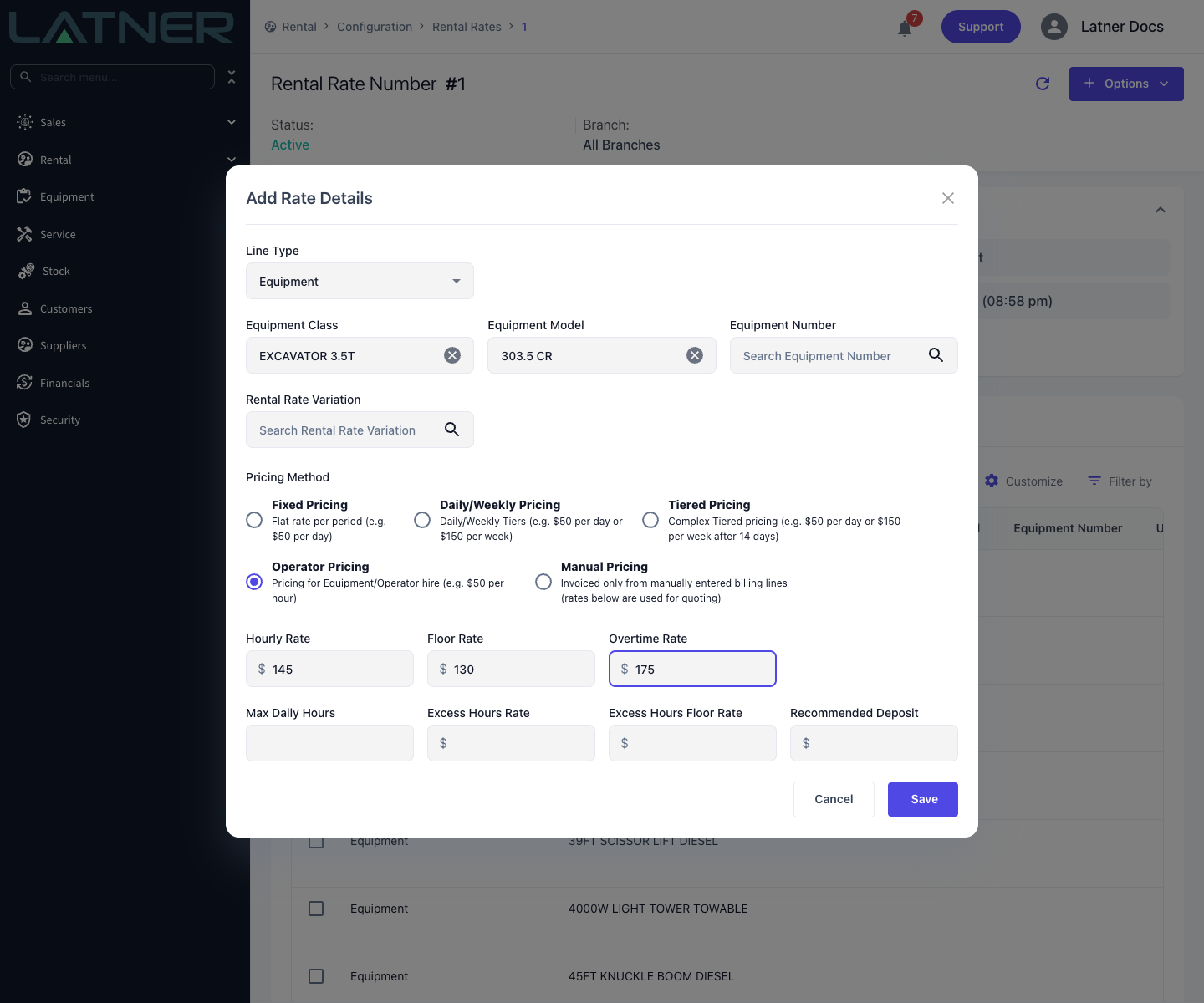
From Rental › Configuration › Rental Rates, open the rate book and choose Options › Add Rate Details. Pick the Equipment Class and, because wet hire is usually quoted per machine type, often the Equipment Model as well.
Step 2 - Select Operator Pricing
Choose Operator Pricing. The rate row changes shape: no Rate Type to pick, and no Minimum Charge underneath.
Step 3 - Enter the hourly rates
-
Hourly Rate - required. The standard charge per hour worked.
-
Floor Rate - optional. The lowest hourly rate anyone may enter without the Allow Rates Below Floor Rate permission.
-
Overtime Rate - required. The charge per hour for overtime.
Step 4 - Save
Click Save. The row shows in the rate book grid with a Pricing Method and a Rate Type of Operator.
How It Bills
Once an Operator line is on a contract, an extra option appears when you tick that line in the Details table: Create Operator Docket. Dockets record the operator's hours as timesheets, and each timesheet carries its own rate type and rate.
When the contract is invoiced, Latner ignores rental rates for that line entirely and instead:
-
Finds every operator docket on the line with a status of Approved, in date order. Dockets that are not approved are skipped.
-
Creates one invoice line per timesheet, quantity being the timesheet's total hours rounded to two decimals, unit price being the timesheet's Retail Rate.
-
Applies the line's Damage Waiver and Environmental Levy percentages to each timesheet's sub total.
-
On a progress invoice, includes only dockets dated on or before the bill-to date. On a return or final invoice, includes every approved docket.
Because the charge comes from timesheets, an Operator line with no approved dockets yet produces no rental charge at all - which is correct, since no work has been done.
Advance invoices, pro forma invoices and rental quotes cannot bill timesheets that do not exist yet, so they fall back to the standard rate flow. On an Operator line that means a $0.00 daily rate, and the quoted or prepaid figure comes from elsewhere on the contract.
On the Invoice
An Operator line has no rate-based invoice line. Each approved timesheet becomes its own line with a Quantity (hours), a Unit Price (the timesheet's Retail Rate) and a description such as Normal Time Timesheet 12/09/2026. Rate Type, Billable Days, Calc. Daily Rate and Adj. Daily Rate are not used.