
Fixed Pricing charges one rate for one period, for the whole hire - the simplest of Latner's pricing methods and the right choice whenever a customer just wants a number they can budget against.
Overview
Most hires do not need anything clever. The customer takes a scissor lift at $80 a day, or a generator at $2,400 a month, and that is the deal for as long as they keep it. Fixed Pricing is that deal.
-
A Fixed rate row carries exactly one Rate Type and one Rental Rate. There is no second tier and no automatic switching.
-
Every rate type is available to it - Daily, Daily (24 hr), Weekly, Weekly (24 hr), Monthly, Flat Monthly, Calendar Month, Calendar Month (Annualized), Hourly and Minimum Hours Per Month.
-
The charge is the rate converted to a daily equivalent and multiplied by the chargeable days, so Charge Days Per Week still shapes the total for every rate type except Flat Monthly and Calendar Month (Annualized).
-
Modifiers still apply. A Minimum Charge, Max Daily Hours with an Excess Hours Rate, and a Floor Rate all work on a Fixed line.
-
Manual Billing Lines can be added on top of a Fixed line as extra charges - milestone fees, damage recharges, goodwill credits.
Before You Begin
Fixed Pricing needs nothing beyond access to the rate book itself.
|
Requirement |
Where to Find It |
|---|---|
|
Rental Rates configuration screen permission |
Security › Configuration › Permission Groups › Rental › Configuration |
|
Allowed Pricing Methods either empty or including Fixed |
Security › Settings › Rental |
|
A Rental Rate book to price into |
Rental › Configuration › Rental Rates |
Setting Up a Fixed Rate
Step 1 - Add a rate row
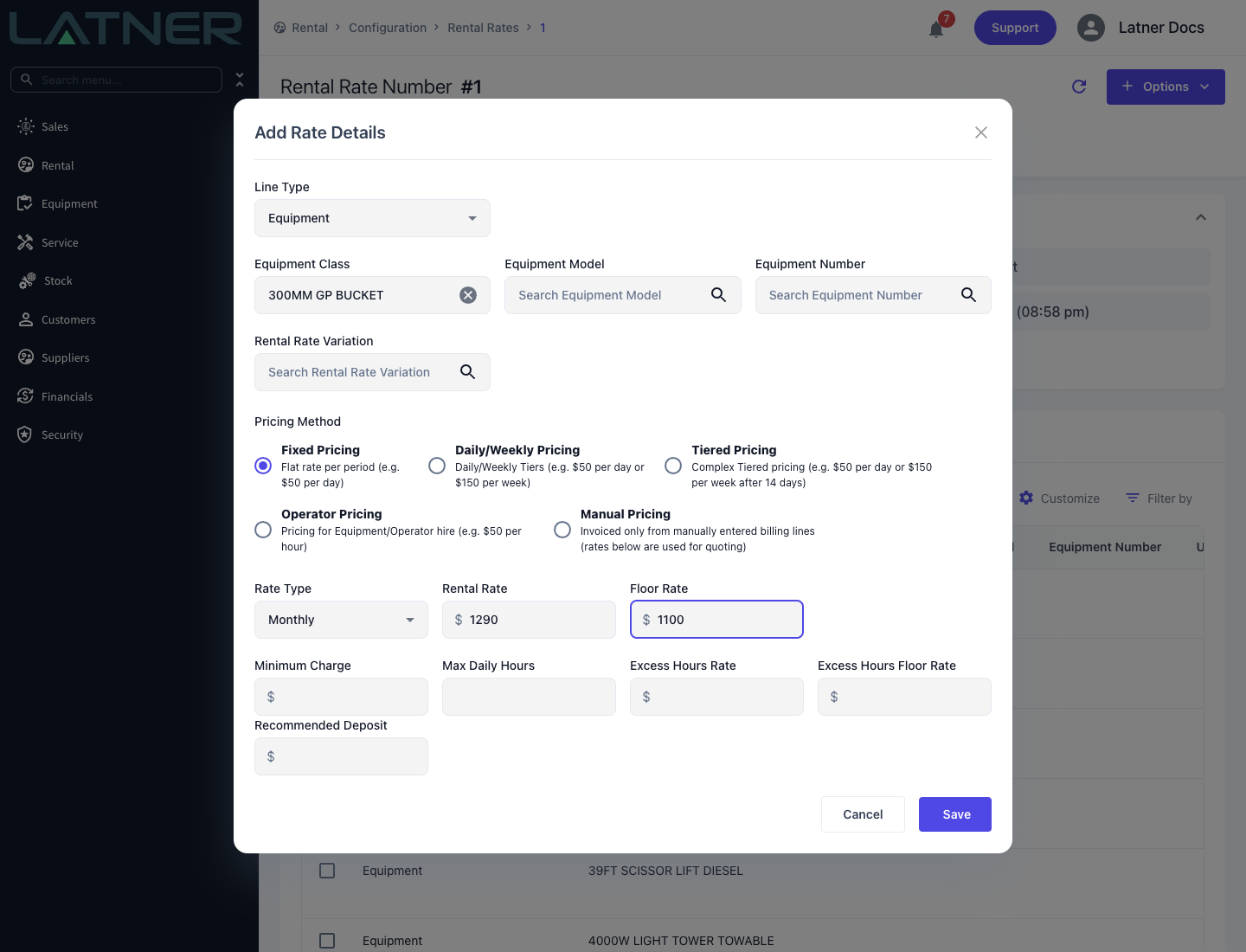
Open the rate book from Rental › Configuration › Rental Rates and choose Options › Add Rate Details. Set the Line Type to Equipment and pick the Equipment Class, plus an Equipment Model or Equipment Number if this rate is only for one model or one machine.
Step 2 - Select Fixed Pricing
Choose Fixed Pricing in the Pricing Method group. A single rate row appears underneath.
Step 3 - Enter the rate
Fill in the row:
-
Rate Type - required. The unit the rate is expressed in.
-
Rental Rate - required. The amount per unit.
-
Floor Rate - optional. The lowest rate anyone may enter for this line without the Allow Rates Below Floor Rate permission.
Two rate types change the row as you pick them. Hourly renames the rate to Hourly Rental Rate and adds an Overtime Rate and a Minimum Hours field. Minimum Hours Per Month does the same and adds a required Minimum Monthly Hours and Hours per Day.
Step 4 - Save
Click Save. The row shows in the rate book's Details grid with a Pricing Method of Fixed, and any quote or contract line for that class picks it up from then on.
How It Bills
Latner counts the chargeable days in the billing period, converts the rate into a daily equivalent and multiplies. What "daily equivalent" means depends on the rate type:
-
Daily and Daily (24 hr) - the rate itself.
-
Weekly and Weekly (24 hr) - the rate divided by the number of Charge Days Per Week. On 5 Days, a $400 weekly rate is $80 a day; on 7 Days it is $57.14.
-
Monthly - the rate divided by 30. Latner treats a month as a flat 30 chargeable days for this rate type.
-
Flat Monthly - no daily equivalent at all. The full rate is charged for each month from the hire start date through to the day before the same date the following month.
-
Calendar Month and Calendar Month (Annualized) - prorated against the real month, or the real year. See Rental Rate Types.
Because the daily equivalent is worked out from Charge Days Per Week, a weekly rate on a 5 Days contract and the same rate on a 7 Days contract bill different totals for the same calendar span. That is deliberate: the 5 Days customer is not being charged for weekends.
Worked example
A 32FT scissor lift on Fixed Pricing, Weekly at $400.00, on a contract with Charge Days Per Week of 5 Days. It goes on rent on a Monday and is off hired the following Friday - ten chargeable days.
-
Daily equivalent: $400.00 / 5 = $80.00
-
Charge: $80.00 x 10 chargeable days = $800.00
The intervening Saturday and Sunday are not chargeable days on a 5 Days contract, so they are not counted and not billed.
When to Use Something Else
-
If the customer should automatically get the weekly rate once a hire runs long enough to be cheaper, use Daily/Weekly Pricing.
-
If the rate should step down at set lengths of hire - a week, a month, three months - use Tiered Pricing.
-
If the machine goes out with an operator and bills by the hour from timesheets, use Operator Pricing.
-
If nothing about the deal is rate based, use Manual Pricing.
On the Invoice
-
Rate Type and Rental Rate - the one rate on the line.
-
Billable Days - the chargeable days in this invoice's period ($80.00 x 10 in the example above).
-
Calc. Daily Rate - the daily equivalent. Blank for Flat Monthly, Calendar Month and Calendar Month (Annualized).
-
Adj. Daily Rate - this invoice's Sub Total per day. It equals the Calc. Daily Rate unless a stand down, a rate adjustment or the Minimum Charge changed the total.
The Hourly rate type bills the hourly rate x Minimum Hours (or x 1 if Minimum Hours is blank) once for the line, not per day and not from the meter. For metered usage use Minimum Hours Per Month or Max Daily Hours with an Excess Hours Rate. See Reading a Rental Invoice Line for every field.