
The Rental Daybook (sometimes written Rental Day Book) provides a consolidated view of all rental contract information, organised into tabs that highlight items requiring attention. It serves as the central workspace for rental managers and is the primary screen from which daily rental operations should be managed.
Rental Daybook Tabs
Upcoming Contracts
Displays all upcoming reservations, with filter options for today, tomorrow, and the next 7 days.
Background colour indicators:
-
White – Transport scheduled and inspection completed
-
Yellow – Transport docket still to be created
-
Red – Open inspection pending
Deliveries
Lists all open delivery dockets, with filters available for today, tomorrow, and the next 7 days.
Pick Ups
Lists all open pick-up dockets, with filters available for today, tomorrow, and the next 7 days.
Customer Collection
Lists all open customer collection dockets, with filters available for today, tomorrow, and the next 7 days.
Active Contracts
Displays all active rental contracts, with filters for returning today, tomorrow, and the next 7 days.
To view all active sub-hires, switch to Detail View and apply the Sub Hire quick filter.
Unreturned Off Hire
Lists all equipment that has been off-hired but not yet returned.
Overdue Off Hire
Lists all equipment where the expected off-hire date has already passed.
Overdue COD
Lists active rental contracts for customers on Cash On Delivery (COD) payment terms where the hire hasn't been invoiced and paid up to today. Whether a customer is COD comes from the payment terms on the customer record.
How Latner decides: a COD contract is listed when any of these is true:
-
An invoice on the contract hasn't been paid yet - its status is Open, Pending Approval or Completed. An invoice becomes Paid once payments or credits clear its full balance.
-
A charge line that hasn't been invoiced yet (for example a delivery, cleaning or damage charge) has a price above $0.
-
Equipment with a rental rate above $0 has been on hire and either hasn't been paid for at all, or the contract's paid invoices only cover the hire up to a date before today. For equipment that has been off hired, the paid invoices must reach its Actual Off Hire Date instead.
The check compares dates only. Stand downs are not taken into account, so a hire paid up to yesterday reappears on the tab today even if a stand down makes today's charge nil.
To clear a contract from the tab, pay any unpaid balance and invoice the hire up to today, then record payment so that invoice is Paid too. While the equipment stays on hire, the contract comes back as soon as the paid-up-to date falls behind - that's your prompt to take the next payment.
With Detail View switched on, the tab lists individual lines rather than contracts and checks invoicing only, not payment: a line shows when it has never been invoiced or its Last Billed To Date is earlier than today (or earlier than its Actual Off Hire Date once off hired).
Returned Uninvoiced
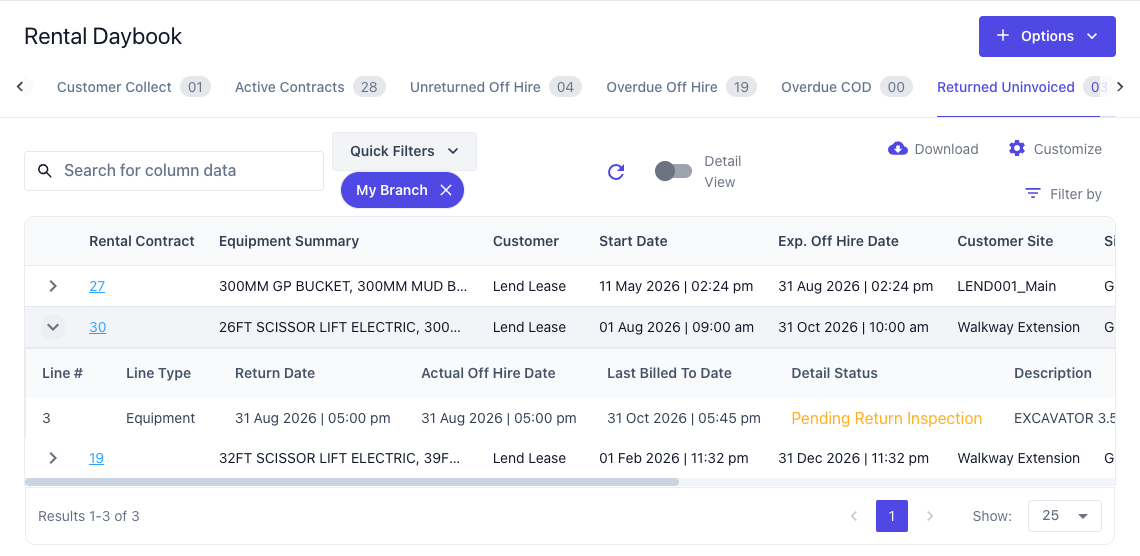
Lists active rental contracts with returned equipment whose billing doesn't line up with the date it came off hire.
How Latner decides: for each returned equipment line with a rental rate above $0, Latner compares the line's Actual Off Hire Date with its Last Billed To Date (the date only, not the time). If the line has never been invoiced, or the two dates differ in either direction, the contract is listed. Latner doesn't check whether anything is actually left to bill, so a contract can appear here when nothing is uninvoiced.
The most common reasons a contract shows here with nothing to invoice:
-
A stand down covers the end of the billing period. If a stand down takes the charge between the last invoice and the off hire date to nil, the final invoice has nothing to charge, so Latner doesn't create one and the Last Billed To Date stays short of the off hire date.
-
The Actual Off Hire Date is earlier than the Last Billed To Date. The equipment has been invoiced past the day it came off hire, so the customer has been over-charged for those days and needs a credit - see How to Create a Credit Note from a Rental Contract.
To check, expand the contract's row: each returned line shows its Actual Off Hire Date and Last Billed To Date side by side. On the rental contract itself, the same columns are on the Details tab - if they're hidden, switch them on under Customize.
Awaiting Completion
Lists all rental contracts where all equipment has been returned, but the contract has not yet been finalised.