
Daily/Weekly Pricing holds a daily rate and a weekly rate side by side and bills whichever one works out cheaper for the customer, so a hire that runs long enough automatically rolls onto the weekly rate without anyone having to remember.
Overview
This is the pricing method for the customer who genuinely does not know how long they need the machine. They take it for two days, keep it for nine, and would be annoyed to find they had been billed nine days at the daily rate when a week and a bit at the weekly rate was cheaper. Latner does that comparison for them, every time it invoices.
-
A Daily/Weekly row carries exactly two rate rows: the first must be a daily rate type, the second a weekly one.
-
The only rate types on offer are Daily, Daily (24 hr), Weekly and Weekly (24 hr). Monthly, hourly and flat rate types are not available on this method.
-
At every invoice Latner compares the two and bills the cheaper. It does not lock in the choice - a hire can move onto the weekly rate and the comparison keeps running.
-
Once the weekly rate is cheaper, Latner bills weekly rate / Charge Days Per Week x billable days, with a minimum of one full week. Past the first week, each extra day is charged at that daily share of the weekly rate, not at the daily rate.
-
Both the on hire day and the off hire day count as billable days, as long as they fall on a charge day.
-
Rows are fixed in place, so there is no remove icon and no way to add a third rate.
Before You Begin
|
Requirement |
Where to Find It |
|---|---|
|
Rental Rates configuration screen permission |
Security › Configuration › Permission Groups › Rental › Configuration |
|
Allowed Pricing Methods either empty or including Daily/Weekly |
Security › Settings › Rental |
|
Allowed Rental Rate Types including at least one daily and one weekly type, if the setting is populated |
Security › Settings › Rental |
If Allowed Rental Rate Types is populated and leaves out every weekly type, the second row will have nothing to choose and the rate cannot be saved. Allow at least one daily and one weekly type before switching this pricing method on.
Setting Up a Daily/Weekly Rate
Step 1 - Add a rate row
From Rental › Configuration › Rental Rates, open the rate book and choose Options › Add Rate Details. Pick the Line Type and the Equipment Class, plus a model or unit if the rate is that specific.
Step 2 - Select Daily/Weekly Pricing
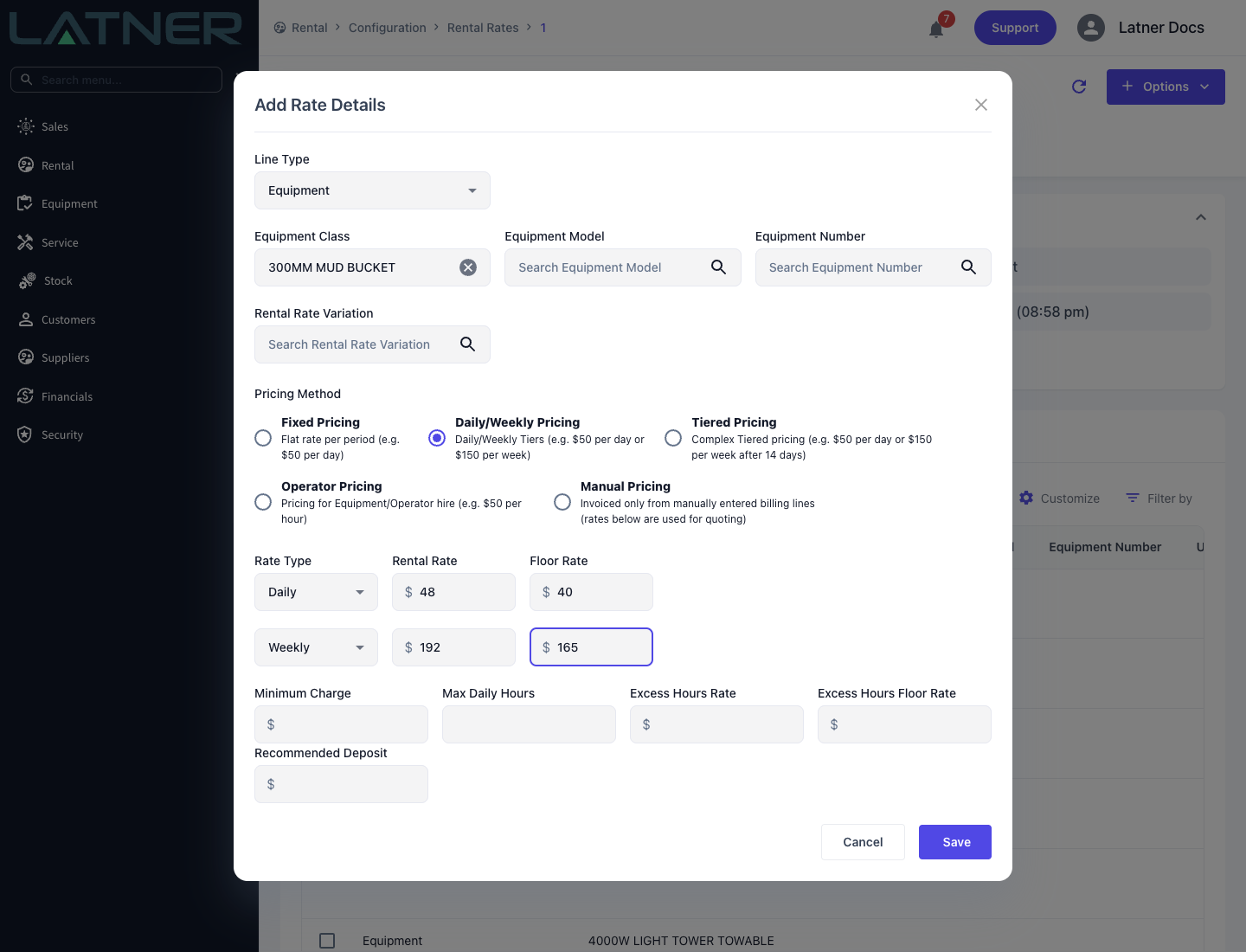
Choose Daily/Weekly Pricing. Two rate rows appear, and they are not interchangeable - the first row only offers the daily rate types and the second only the weekly ones.
Step 3 - Enter both rates
Fill in both rows. Each needs a Rate Type and a Rental Rate, with an optional Floor Rate.
Step 4 - Save
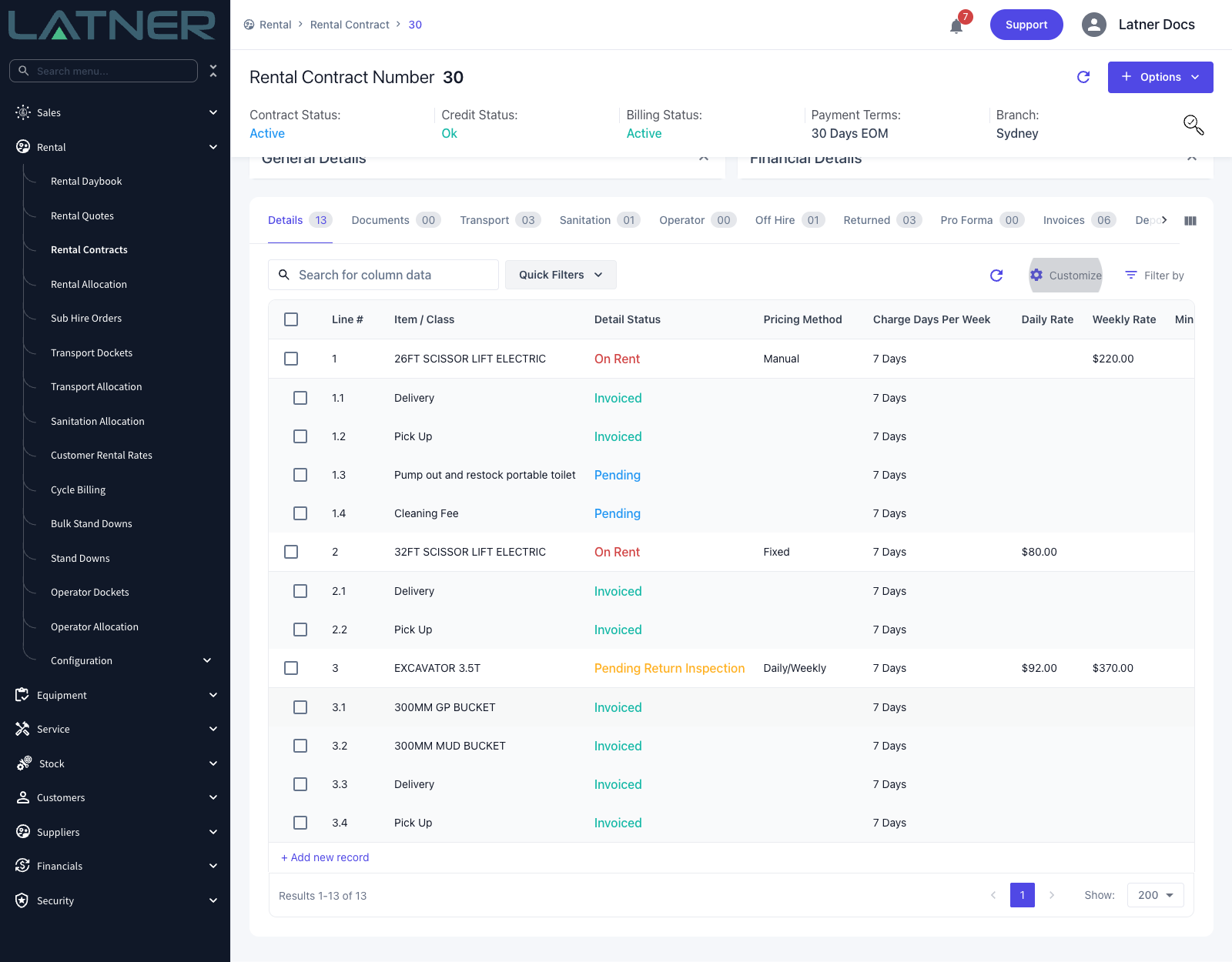
Click Save. The rate book grid shows the row with a Pricing Method of Daily/Weekly and both rates stacked in the one row. Contract and quote lines added for that class from then on pick up Daily/Weekly Pricing and both rates.
How Latner Chooses
Each time it prices the line, Latner works out what each rate would cost over the whole hire so far and takes the lower figure:
-
Daily cost = daily rate x billable days.
-
Weekly cost = the weekly rate's daily equivalent x whichever is larger, the billable days or one full week's charge days. This is what forces a minimum of one week once the weekly rate is in play.
The weekly rate's daily equivalent is the weekly rate divided by Charge Days Per Week, so the crossover point moves with the billing calendar. On a 5 Days contract the weekly rate is spread over five days; on 7 Days it is spread over seven and looks cheaper per day.
Put together, the rule is: once the weekly rate is cheaper, Latner bills weekly rate / Charge Days Per Week x billable days, with a minimum of one full week. The weekly rate only wins when it is strictly cheaper - if the two come out level, the daily rate is used.
Latner then subtracts what it has already invoiced for the line, so each invoice only charges the difference between the new running total and what the customer has been billed so far.
Counting billable days
A billable day is any date the equipment is on rent that is also a charge day for the line's Charge Days Per Week. Latner counts the on hire date and the off hire date inclusively, so the off hire day is a billable day.
For example, on a 5 Days contract, a machine that goes on hire on a Wednesday and is off hired the following Wednesday is on rent for 6 billable days: Wednesday, Thursday, Friday, Monday, Tuesday and Wednesday. The Saturday and Sunday in between are not charge days on 5 Days, so they are not counted.
Stand downs reduce the billable days, and the Daily (24 hr) and Weekly (24 hr) rate types count 24 hour blocks from the hire start time instead of calendar dates - see the FAQs below.
Worked example
An excavator on Daily/Weekly Pricing - Daily $320.00, Weekly $900.00 - on a contract with Charge Days Per Week of 5 Days. The weekly rate's daily equivalent is $900.00 / 5 = $180.00.
-
1 billable day - daily $320.00 against weekly $180.00 x 5 = $900.00. Daily wins: $320.00
-
2 billable days - daily $640.00 against $900.00. Daily wins: $640.00
-
3 billable days - daily $960.00 against $900.00. The weekly rate is now cheaper, and it charges its full week: $900.00
-
5 billable days - daily $1,600.00 against $900.00. Still one full week: $900.00
-
6 billable days - daily 6 x $320.00 = $1,920.00 against weekly $900.00 / 5 x 6 = $1,080.00. Weekly wins: $1,080.00
-
10 billable days - daily $3,200.00 against $180.00 x 10 = $1,800.00. Weekly wins: $1,800.00
Two things to notice. On day 3 the customer's bill goes down from what the daily rate would have cost ($960.00) to the weekly rate ($900.00) - nobody pays more than a week's hire for less than a week's use. And on day 6, the extra day costs $180.00, not $320.00: the bill is six days at the weekly rate's daily equivalent ($1,080.00), not a week plus a day at the daily rate ($1,220.00) and not six days at the daily rate ($1,920.00).
The Wednesday to Wednesday hire above is exactly this 6 billable day case, so on these rates it bills $1,080.00.
A stand down does not undo the weekly rate once the hire has entered it. If a four day hire with a stand down comes back to 3.5 chargeable days, Latner still charges the full weekly rate, because the hire has already crossed into the weekly tier. The stand down is not lost - it shows up in the next billing period once the hire has run past the full weekly cycle.
On the Invoice
-
Rate Type and Rental Rate - whichever of the two rates is billing now.
-
Calc. Daily Rate - the daily rate, or once the weekly rate wins, the weekly rate divided by Charge Days Per Week ($180.00 in the example above).
-
Billable Days - the chargeable days in this invoice's period, counting the off hire day.
-
Adj. Daily Rate - this invoice's Sub Total per day. On the invoice where the line switches to the weekly rate it includes the credit for earlier days billed at the daily rate, so it can sit well below the Calc. Daily Rate.
See Reading a Rental Invoice Line for every field.
FAQs
How do I charge only the daily rate?
Use Fixed Pricing with a Daily rate type instead of Daily/Weekly Pricing. Fixed Pricing never switches rates, so every billable day is charged at the daily rate. You can do this for one contract line, or for every new line through the rate book.
For one line on a contract - do this before the line is invoiced:
-
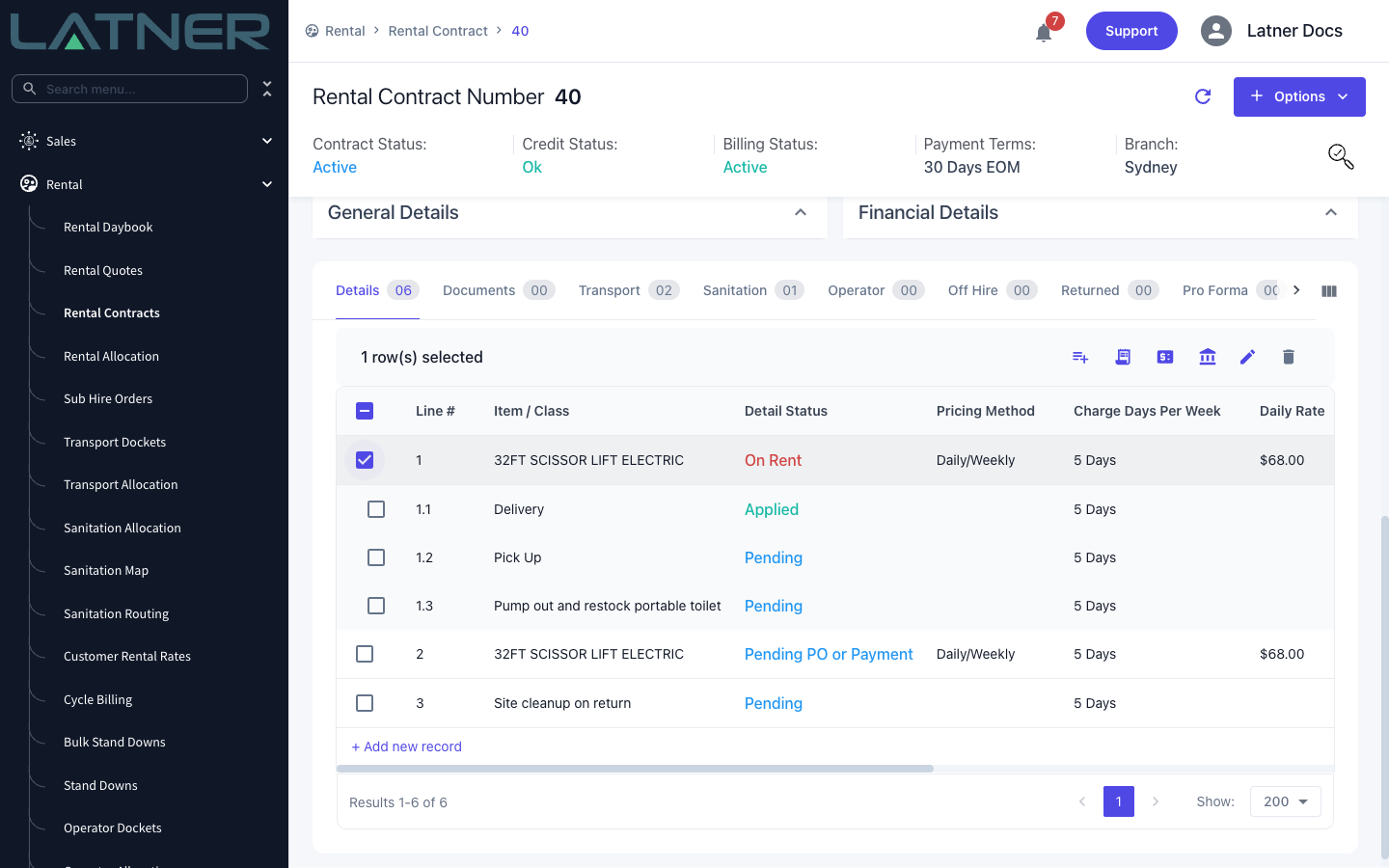
Open the rental contract and go to the Details tab.
-
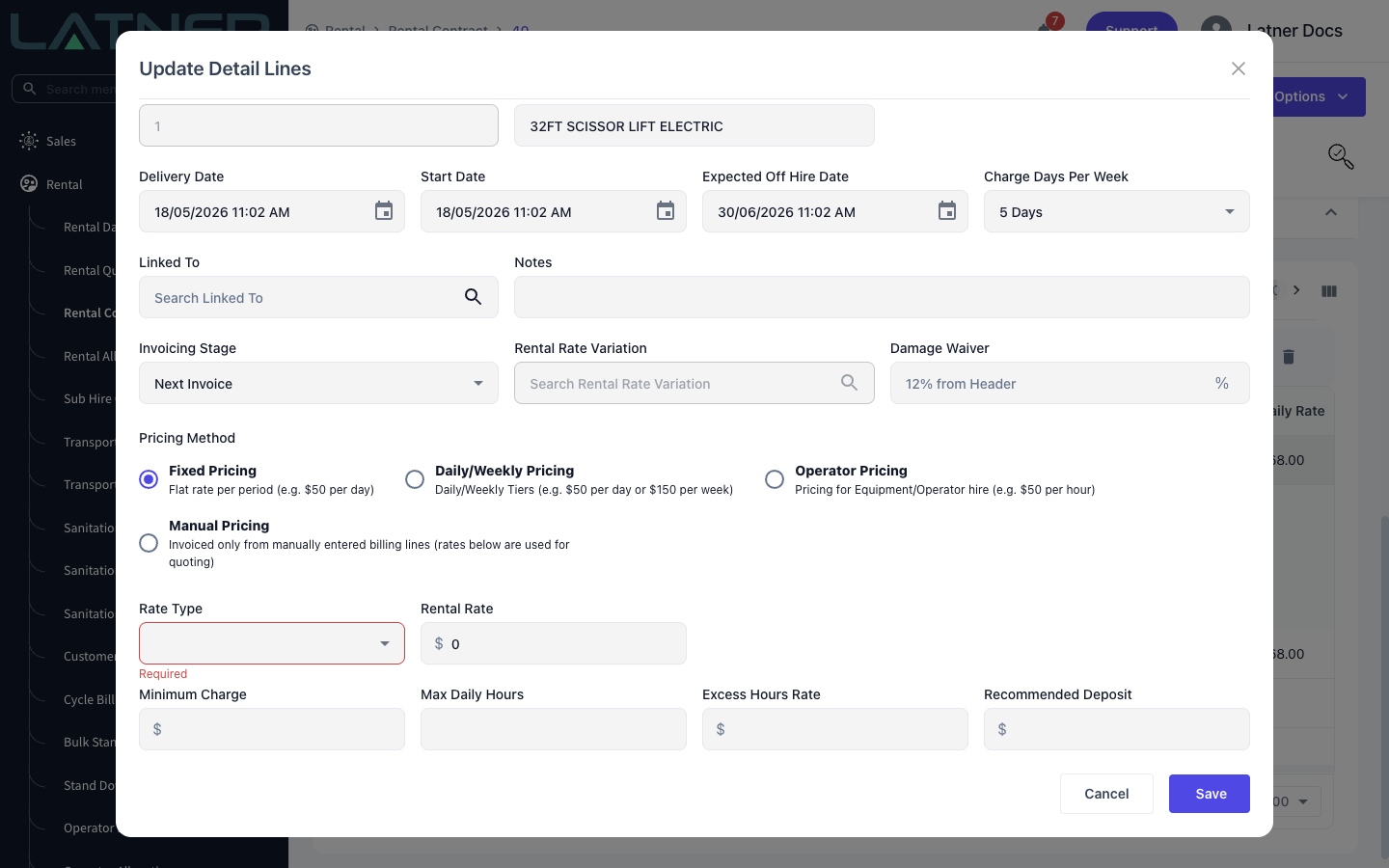
Tick the line and click the Edit pencil in the table toolbar (or double-click the line). The Update Detail Lines dialog opens.
-
Under Pricing Method, select Fixed Pricing. The rate fields clear when you switch.
-
Set Rate Type to Daily, enter the daily rate in Rental Rate, and click Save.
Once a line has been invoiced, its Pricing Method, Rate Type and Rental Rate are locked, with the message Cannot change Rate Details after invoicing. Make the change before the first invoice for that line. Editing a line needs the Edit Rental Contract Details permission, and changing the rate itself needs Edit Rental Rates. If Daily is missing from the Rate Type list, the Allowed Rental Rate Types setting under Security › Settings › Rental is leaving it out.
For every new line - open the row in Rental › Configuration › Rental Rates and change its Pricing Method to Fixed Pricing with a Daily rate type. Lines added after the change pick up Fixed Pricing. Lines already on a contract keep the pricing they were added with, so change those one by one as above.
Bear in mind that a Fixed daily line never caps at the weekly rate: a ten day hire is billed ten days at the daily rate, however long it runs.