
The Utilisation tab on the Dashboard shows how much of your rental fleet was out on hire, month by month or day by day, so you can see which categories, classes or branches are earning their keep.
Overview
Utilisation is a tab on the Dashboard home screen, not a screen under the Equipment menu. It measures time utilisation: the share of the days your equipment was available that it spent on a rental contract.
-
Utilisation = equipment-days on a rental contract ÷ equipment-days in your fleet, for the period and group you choose.
-
It's a day-weighted figure: a month's utilisation for a class is the total days its machines were on hire divided by the total days they were in the fleet, not an average of daily percentages.
-
How days are counted (every calendar day, or only charge days, and whether stand downs reduce it) is set once for the business by the Equipment Utilisation Calculation Method setting.
-
The figures are rebuilt overnight, so today's on-hires and off-hires show up tomorrow.
Before You Begin
Here's what you need to see this tab.
|
Requirement |
Where to Find It |
|---|---|
|
Equipment Performance/Utilisation Dashboard permission (also shows the Financial Utilisation tab) |
Security › Configuration › Permission Groups, Equipment module, Screen permissions |
|
Equipment Utilisation Calculation Method setting |
Security › Settings › Equipment |
|
Exclude Pending Activation Equipment from Equipment Utilisation setting (optional) |
Security › Settings › Equipment |
How Utilisation Is Calculated
Latner works out, for every piece of equipment, every day and every branch, two numbers, then adds them up across your filters and Group By:
-
Possible days (the fleet) - the days the equipment was held at the branch. Equipment joins the fleet when it's created or activated and leaves when it's sold, disposed of or deactivated; transfers move it from one branch to the other on the day the transfer is received. Internal Use and Customer Owned equipment is never counted.
-
Charge days (on hire) - the days the equipment was on a rental contract line, from the line's start date to its actual off hire date (or today if it's still out), both days included. Lines that are still reserved, pending delivery or collection, pre-allocated or cancelled don't count; on rent, off rent, returned and invoiced lines do.
Sub hire equipment isn't part of your fleet, so it's left out of both numbers. Bulk equipment counts by quantity: 10 units for a day is 10 equipment-days.
The calculation methods
The Equipment Utilisation Calculation Method setting (Security › Settings › Equipment) changes which days count. It applies to everyone's Utilisation tab.
-
Calendar Days - every day of the week counts, weekends included, for both on-hire days and fleet days.
-
Calendar Days and Stand Downs - as Calendar Days, but days covered by a completed stand down on the rental contract are taken off the on-hire days in proportion to the stand down.
-
Charge Days per Week - a rental line only counts on its own charge days (5 Days is Monday to Friday, 6 Days Monday to Saturday, 7 Days every day, Saturday, or Weekend), and the fleet only counts the charge days of the equipment class (or the Default Charge Days Per Week rental setting if the class has none). A machine on hire Monday to Friday on a 5-day class is 100% utilised for that week.
-
Charge Days per Week and Stand Downs - Charge Days per Week, less completed stand downs that fall on charge days.
With a Charge Days method, a rental line with no Charge Days Per week value doesn't add any on-hire days. A line charged on more days than its class's charge days can push utilisation above 100%.
Excluding Pending Activation equipment
New equipment often sits in Pending Activation before it's ready to rent. It can't be hired, but by default it still counts towards the fleet, which drags utilisation down. Turn on Exclude Pending Activation Equipment from Equipment Utilisation (Security › Settings › Equipment) to leave it out until it's activated.
The setting looks at each machine's status today, not its history. Once a machine is activated it's counted for every past day it was in the fleet as well, so past months' utilisation can drop slightly after an activation.
Using the Utilisation Tab
Step 1 - Open the tab
Open Dashboard and select Utilisation. It loads monthly utilisation from the first of last month, grouped by Equipment Category.
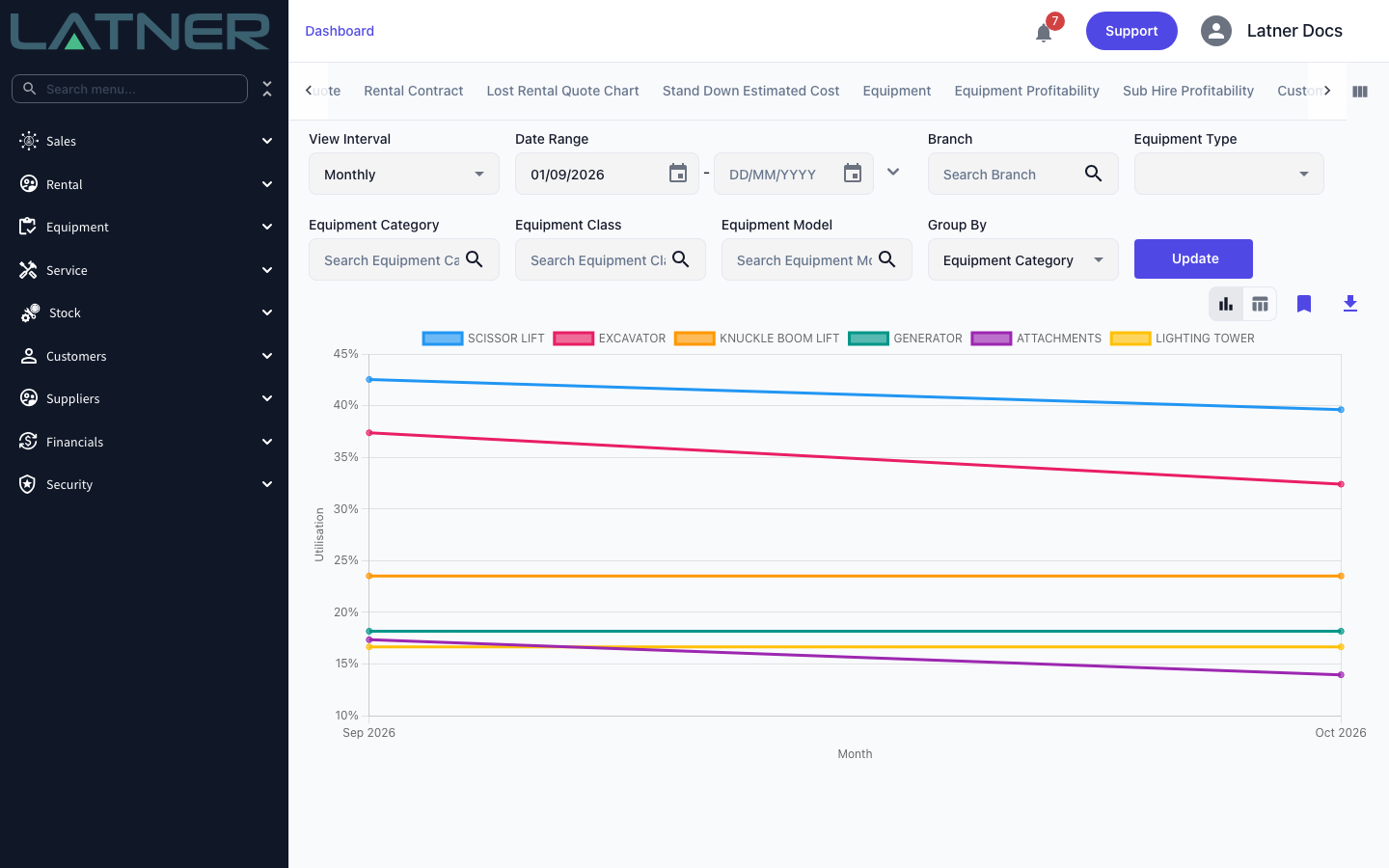
Step 2 - Set the filters
-
View Interval - Monthly, or Daily (30 Days Max). Daily needs both dates and a range of no more than 30 days; switching to Daily sets the last 7 days for you.
-
Date Range - the days to include. Leave the end date blank to run to today; the current month is month to date.
-
Branch, Equipment Type (Serialized or Bulk), Equipment Category, Equipment Class and Equipment Model - narrow the fleet.
-
Group By - Company, Division, Branch, Equipment Category, Equipment Class, Equipment Make, Equipment Model, Equipment Number or Equipment Type.
Click Update to refresh.
Step 3 - Switch between chart and table
The chart shows one line per group. Use the Table View button for a grid of groups against periods, coloured from red (low) to green (high). In the table, the Show Days Columns button adds Possible Days and Charge Days for each period so you can see the numbers behind each percentage. Your choice of view is remembered.
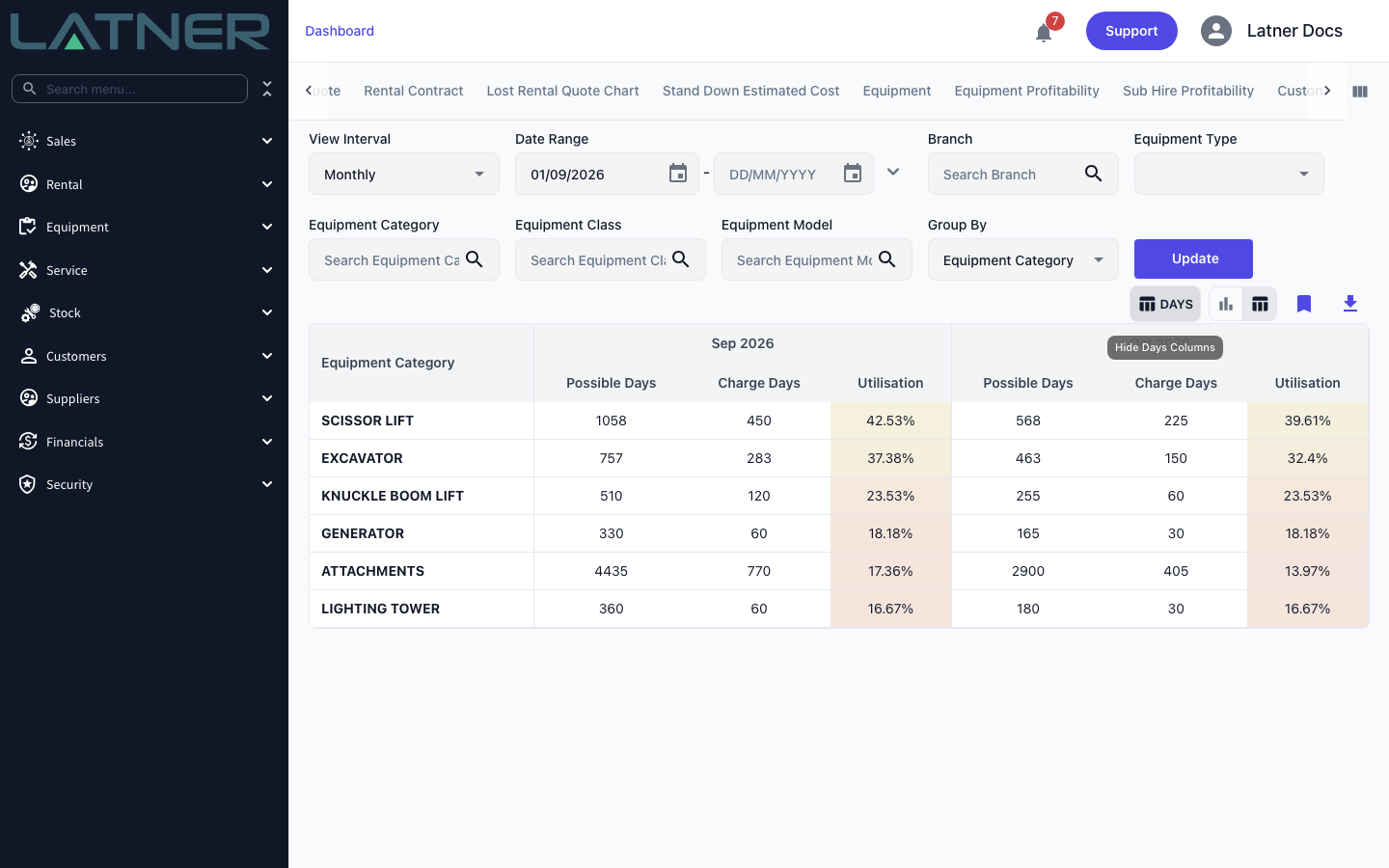
Step 4 - Download the data
Click Download Data to save Equipment Utilisation.csv. From the table view you get each period's Possible Days, Charge Days and Utilisation; from the chart view you get one utilisation figure per group and period.