
The Sub Hire Profitability tab on the Dashboard compares what you charged customers for sub hired equipment with what your suppliers charged you, so you can see which classes and suppliers make money.
Overview
It's a tab on the Dashboard home screen showing a table, one row per group.
-
Customer Revenue comes from customer invoice lines for the sub hire lines on your rental contracts.
-
Supplier Cost comes from supplier invoice lines linked to the sub hire order lines - not purchase orders.
-
Invoices in any status except Cancelled count, including open ones. Credit notes are subtracted. Amounts exclude GST.
-
Only sub hire lines linked to an equipment class on a rental contract are included.
Before You Begin
Here's what you need to see this tab.
|
Requirement |
Where to Find It |
|---|---|
|
Sub Hire Profitability Dashboard permission |
Security › Configuration › Permission Groups, Rental module |
|
Supplier invoices entered against your sub hire orders |
Suppliers |
Using the Tab
Step 1 - Set the filters
-
Branch, Supplier, Equipment Category and Equipment Class.
-
Invoice Date Range - customer invoice dates for revenue and supplier invoice dates for cost. Leave it blank for all time.
-
Group By - one or more of Equipment Category, Equipment Class, Branch and Supplier (Equipment Class and Supplier by default). At least one is required.
Click Update.
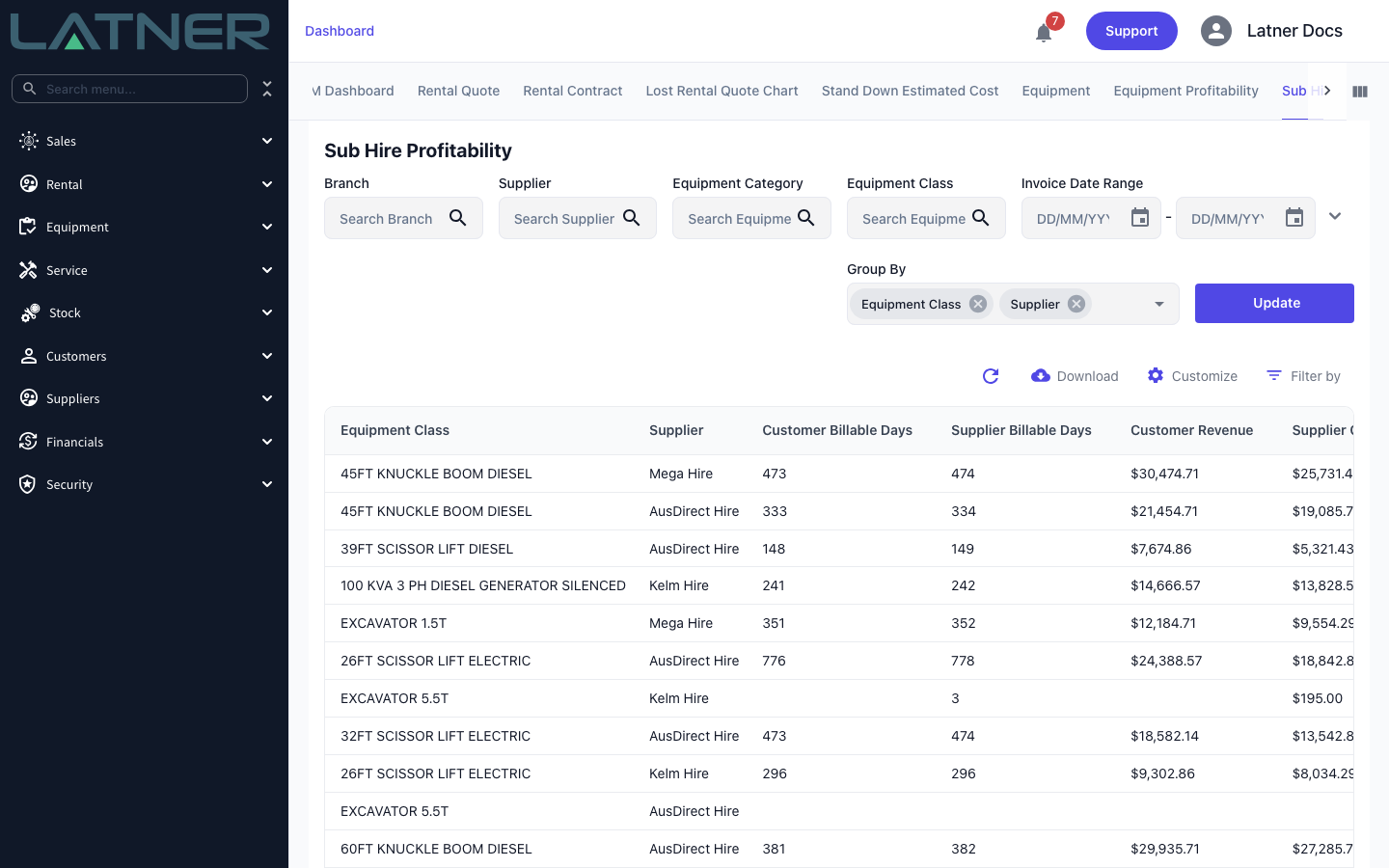
Step 2 - Read the figures
-
Customer Billable Days and Supplier Billable Days - billed days less stand down days, times quantity.
-
Customer Revenue and Supplier Cost - as above.
-
Profit = Customer Revenue − Supplier Cost.
-
Avg. Daily Customer Rate = Customer Revenue ÷ Customer Billable Days; Avg. Daily Supplier Rate = Supplier Cost ÷ Supplier Billable Days.
-
Avg. Daily Markup $ = the difference between the two daily rates.
-
Avg. Daily Markup % = Avg. Daily Markup $ ÷ Avg. Daily Supplier Rate - markup on cost, not margin on revenue.
Step 3 - Download the data
Use the download icon on the table to save subHireProfitability.csv with every row and your filters applied.
FAQs
Watch the Demo
Prefer to watch it? Step through the same screen here.