
This page explains what Latner is actually doing behind a depreciation run - how an asset gets its starting value, how each month is worked out, what happens when you sell or dispose of a machine, and exactly which journal entries reach your accounting system.
Overview
Most of the time you do not need to know any of this. You set an asset up, you run depreciation each month, and the numbers land in Xero, MYOB or Sage. This page is for the month when they do not look right, and you need to know where a figure came from.
-
Every asset has a cost base - a purchase price, a quantity and an activation date - and depreciation is always calculated from those.
-
Depreciation runs as one line per calendar month, per asset, on two independent books.
-
Sales, disposals and conversions are not valued when they happen. The next depreciation run splits the month at the movement date, depreciates up to that point, and only then writes the value off.
-
Posting aggregates many assets into a handful of journal lines. Your journal is not per-asset.
-
Only the account book is journalled. The tax book is never posted.
Before You Begin
|
Requirement |
Where to Find It |
|---|---|
|
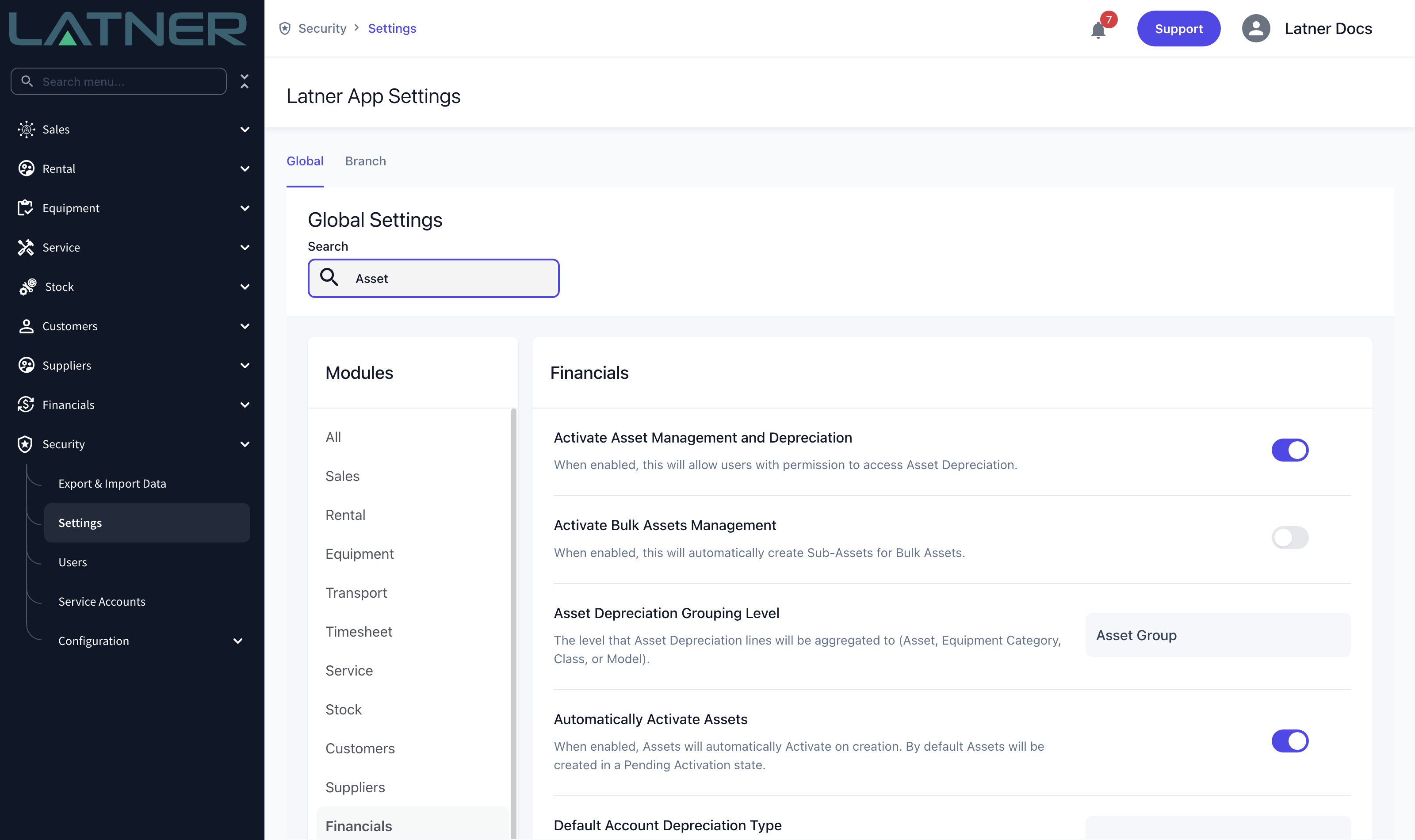
Activate Asset Management and Depreciation is switched on |
Security › Settings › Global › Financials |
|
The Assets permission |
Security › Configuration › Permission Groups › Financials › Screen |
|
The Asset Financial Details permission, to see purchase prices and book values |
Security › Configuration › Permission Groups › Financials › Field |
|
A connected accounting integration, if you want journals to sync |
Financials › Configuration › Accounting Integration |
|
End of Financial Year set correctly, if you use financial-year diminishing types |
Security › Settings › Global › Financials |
Where an Asset Gets Its Starting Values
Depreciation is only ever as good as the cost base underneath it, so it is worth knowing which route created the asset and what each route filled in.
|
How the asset was created |
What Latner fills in |
|---|---|
|
Receiving a purchase order with an Asset line |
One asset per unit for a serialized line, or a single asset for the whole quantity otherwise. Purchase price comes from the PO line unit cost, and purchase date from the receipt date. The asset group comes from the PO line. Assets created this way get a temporary number you should replace. |
|
Receiving a purchase order with an Equipment line |
The equipment is created first, and it creates its own asset carrying the same number, description, branch, type, purchase price and receipt date. |
|
Creating equipment any other way |
The asset is created alongside it with the equipment’s number and description. Rename the equipment later and the asset number follows. |
|
A bulk equipment adjustment that increases quantity |
A new sub-asset for that batch, with its own purchase price and date, so each batch depreciates on its own cost. Only an increase creates a sub-asset - reducing quantity is treated as a disposal. |
|
Converting equipment |
New assets carrying a proportional share of the original cost and of the current written-down value. See the conversions section below. |
|
Creating an asset by hand, or importing |
Whatever you enter. You type the asset number yourself; nothing is generated. |
A sub-asset is created for a bulk batch when the header asset is already Active, or when Activate Bulk Assets Management is switched on. If neither is true, the quantity goes up but no new sub-asset appears to carry its cost - which is the usual reason a bulk adjustment seems to depreciate nothing.
Sub-assets are numbered from their parent, as PARENT-0001, PARENT-0002 and so on.
Activation sets the opening book values
Activating an asset out of Pending Activation is what seeds both books:
-
Opening book value = purchase price × original quantity, on the account book and the tax book alike. Purchase price is always a unit price.
-
The activation date is taken from the date already on the record, or failing that the purchase date, or failing that today in the branch’s timezone.
-
Depreciation only ever accrues from the activation date.
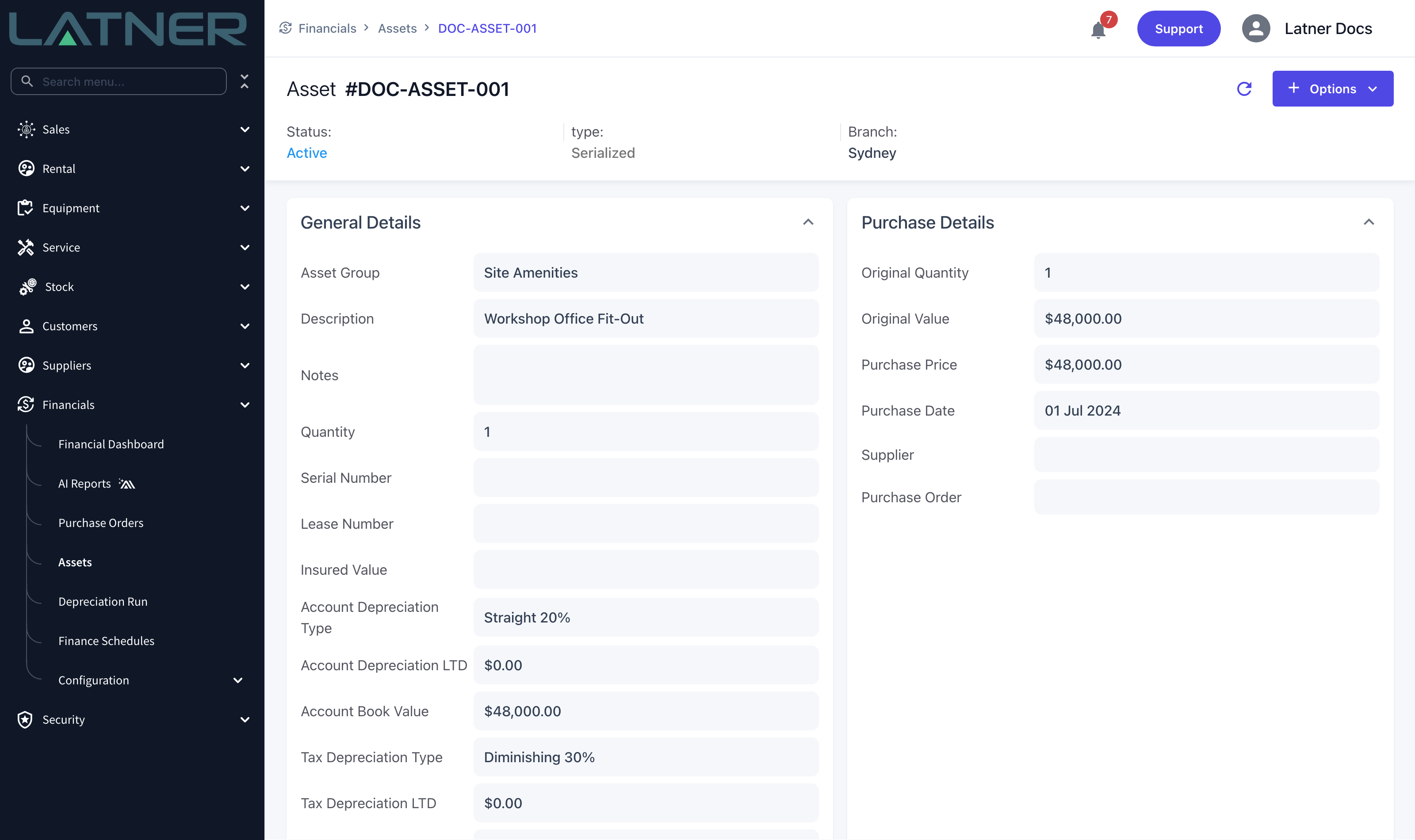
Activating an asset that was Inactive does not reseed the book values - it resumes from where it stopped. Only activation out of Pending Activation sets them from the purchase price. If you deactivate and reactivate expecting a reset, you will not get one.
How Each Month Is Calculated
Depreciation is generated as calendar-month lines, starting the day after the asset was last depreciated - or from its activation date if it never has been - and running to the end date of the run. Every method works out a daily rate and multiplies it by the days in the period, which is why part-months and leap years come out right.
|
Method |
How the amount is worked out |
|---|---|
|
Straight Line |
A fixed percentage of the original cost each year, spread daily. The year is the anniversary of the activation date, so it uses 365 or 366 days as appropriate. |
|
Diminishing, anniversary based |
A percentage of the value carried into the year, where that value is the original cost reduced by the rate once for each whole year since activation. |
|
Diminishing, with Use Financial Year ticked |
The same, except the year runs from the day after your End of Financial Year date, and the value carried in is the one snapshotted at the last year end. |
|
Write Off |
The whole original value in the first line. There is no rate. |
A worked example makes the difference obvious. An asset bought for $48,000 and activated on 1 July 2024, depreciated on Straight Line 20%, gives $9,600 a year, which is $26.30 a day. So a 31-day month charges $815.34 and February 2026 charges $736.44. Put the same asset on Diminishing 30% and it writes down considerably faster in the first two years.
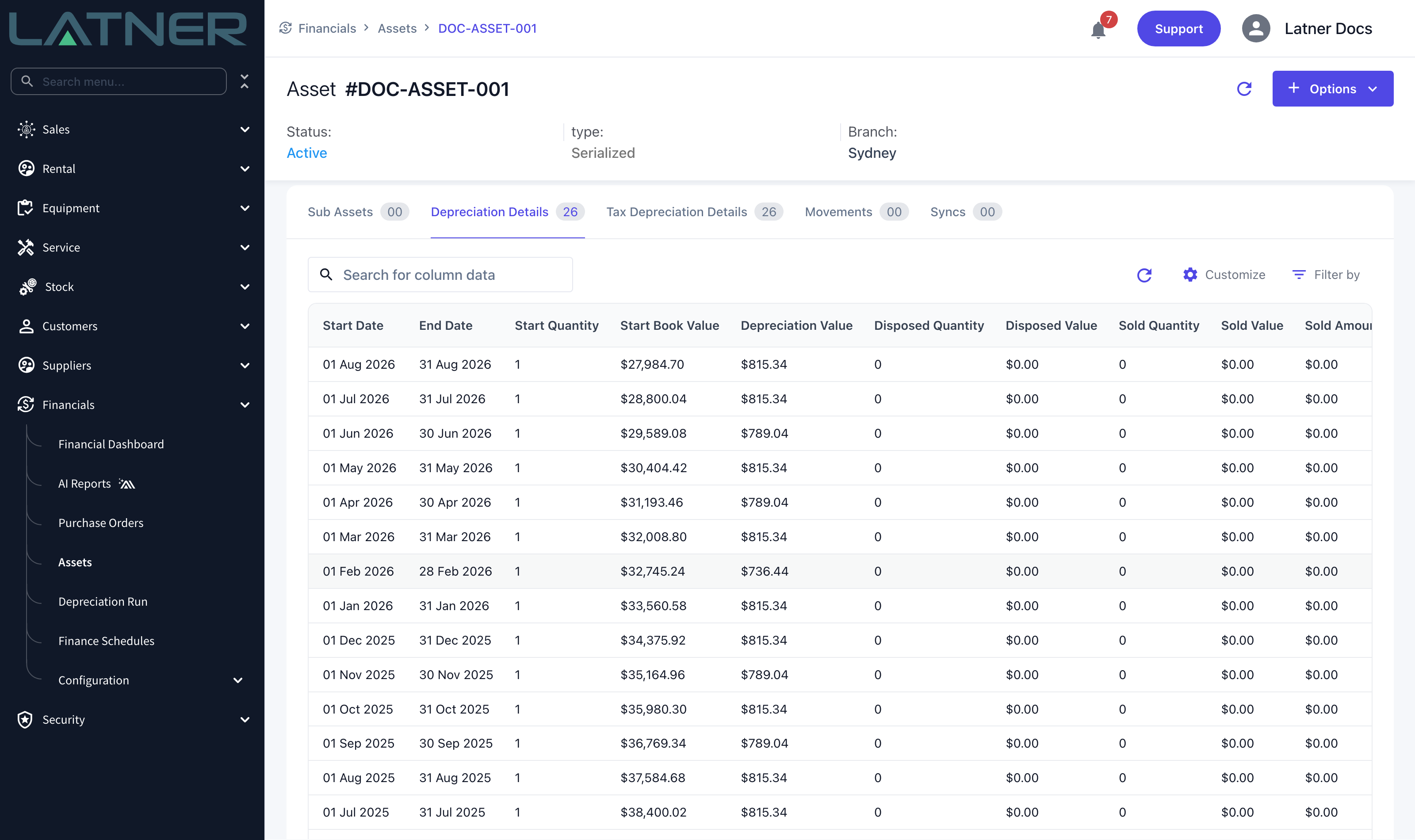
After each run Latner rolls the asset forward: book value, depreciation date, depreciation quantity, depreciation life-to-date and the end-of-financial-year carry-over value. The tax book does exactly the same, independently, using the tax depreciation type.
When a line ends on your End of Financial Year date, Latner snapshots the closing unit value onto the asset. That snapshot is what a financial-year diminishing type uses as next year’s opening base, which is why the EOFY date has to be right before you run anything.
Two things stop an asset producing lines at all: no purchase price, and no depreciation type on the book being run. A bulk run skips those assets silently; the single-asset Calculate Depreciation action tells you which one is missing.
Sales and Disposals
Selling or disposing of equipment creates an equipment movement, and Latner immediately attaches that movement to the matching asset. What it does not do is work out the money.
-
Serialized equipment - the movement goes to its single linked asset. Quantity drops to zero, the status becomes Sold, Disposed or Converted, and the movement date is recorded.
-
Bulk equipment - the quantity is consumed across the active sub-assets oldest purchase first, so the earliest batches are sold down before the later ones. A sub-asset only takes the terminal status once its quantity reaches zero.
The valuation happens in the next depreciation run. That run splits the month at the movement date: it charges depreciation from the start of the month up to the day of the sale, and only then measures the write-off against the freshly depreciated book value.
This is why the month of a sale shows a part-month depreciation charge and a sale line, and why gain or loss is measured against the book value as at the sale date, not as at the start or end of the month.
Gain or loss is simply proceeds less written-down value. It is not stored anywhere on the asset - it is derived, and shown as Sold Gain/Loss on the depreciation line and in the run download.
Sold, Disposed and Converted assets keep being picked up by depreciation runs, which is deliberate: it is how the final part-month and the write-off get captured. They stop naturally once book value and quantity reach zero.
Conversions
Converting equipment turns one set of machines into another - splitting a package into parts, or merging parts into one unit. In the Convert Equipment dialog you list what you are converting from, what you are converting to, and give each new item a Value Proportion.
Behind the scenes Latner:
-
Previews depreciation on the source assets up to the conversion date, so it knows what they are worth on both books at that moment.
-
Splits that value between the new items according to the value proportions you entered.
-
Treats whatever is left over as scrapped and writes it off. If your proportions add up to 90%, the remaining 10% is scrapped.
-
Creates the new assets with a purchase price that is their share of the original cost, and an opening book value that is their share of the current written-down value.
-
Sets the new assets’ depreciation dates to the day before the conversion, so they pick up seamlessly from the conversion date with no gap and no double charge.
Conversion is irreversible, and the dialog says so. Value proportions cannot add up to more than 100%. Note also that the new assets inherit the earliest purchase date of the assets they came from, not the conversion date - so a converted asset can look older than it appears.
Conversions and scrapping do not produce journal lines. The converted and scrapped values are recorded against the posted depreciation and are visible on screen and in the download, but they are not included in the journal pushed to your accounting system. If you convert equipment, the accounting entry for it has to be raised in your accounting system by hand.
From Depreciation Lines to a Journal
Posting is where per-asset detail becomes accounting. It is not a one-to-one mapping.
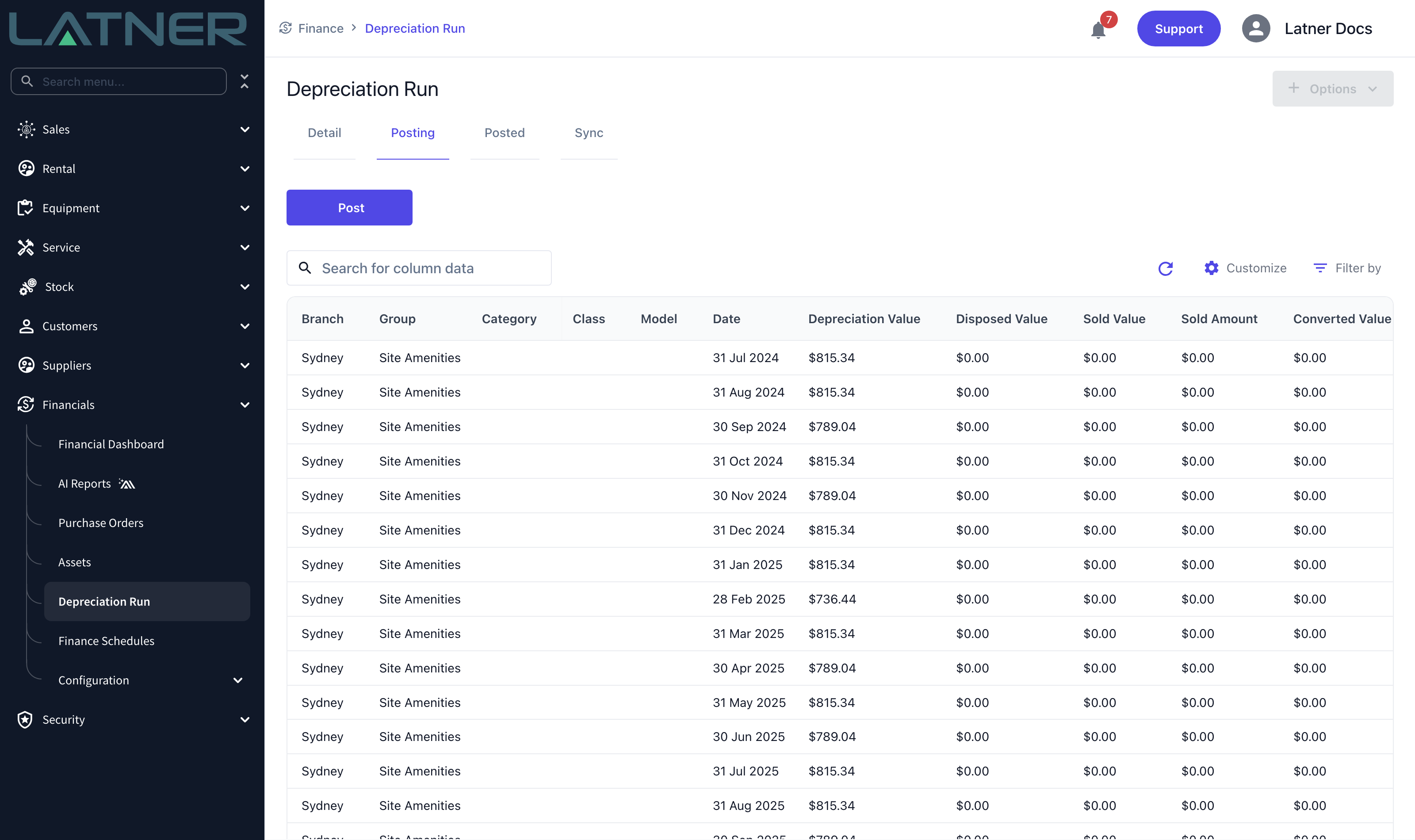
Latner aggregates every unposted account-book line by company, branch, asset group and month. If Asset Depreciation Grouping Level is set to something more detailed, it also splits by equipment category, class or model. Everything in one bucket becomes one set of journal lines.
|
Part of the journal |
What it contains |
|---|---|
|
Journal date |
The last day of the latest month in the batch. |
|
Narration / memo |
Latner Depreciation Run followed by the run number, so you can trace a journal back to a run. |
|
Line description |
The date, then the branch, then whichever of model, class and group apply - for example 2026/07/31 - Sydney - Site Amenities. Each line is prefixed with Depr.:, Sold: or Disposed: so you can tell the three apart at a glance. |
Because gains and losses are decided per aggregated line, two machines sold in the same branch, group and month will net against each other - a $2,000 gain and a $500 loss post as a single $1,500 gain. If you need them separated, set a more detailed Asset Depreciation Grouping Level, or put the assets in different asset groups.
The Sync tab on the Depreciation Run screen shows the result of each push, with the error message on anything that failed.
The Journal Entries
Three kinds of line can appear, and each one is only written when there is an amount to write.
Monthly depreciation
|
Account |
Debit |
Credit |
|---|---|---|
|
Depreciation Expense |
The month's depreciation |
|
|
Accumulated Depreciation |
|
The month's depreciation |
Disposal, with no proceeds
|
Account |
Debit |
Credit |
|---|---|---|
|
Accumulated Depreciation |
Original cost less written-down value |
|
|
Asset Loss on Disposal |
Written-down value |
|
|
Fixed Asset, at cost |
|
Original cost |
The asset comes off the balance sheet at cost, its accumulated depreciation is reversed, and whatever was still on the books goes to the profit and loss as a loss.
A disposal always goes to the loss account. There is no gain path for a disposal, because there are no proceeds. A fully depreciated disposal has no loss to book, so it produces only the two balance sheet lines.
Sale
|
Account |
Debit |
Credit |
|---|---|---|
|
Asset Cash Account |
Proceeds |
|
|
Accumulated Depreciation |
Original cost less written-down value |
|
|
Asset Gain on Disposal (if a gain) |
|
Gain |
|
Asset Loss on Disposal (if a loss) |
Loss |
|
|
Fixed Asset, at cost |
|
Original cost |
The proceeds are debited to the Asset Cash Account, which is a clearing account - not to revenue. The customer invoice you raise for the sale syncs separately through the normal invoice flow and provides the other side of it. The clearing account should net to zero once both have posted; a balance sitting in it usually means the invoice has not synced, or was never raised.
A worked example
An asset that cost $12,000 with $4,000 of accumulated depreciation at the sale date, so a written-down value of $8,000.
Sold for $9,500, a gain of $1,500:
|
Account |
Debit |
Credit |
|---|---|---|
|
Asset Cash Account |
9,500 |
|
|
Accumulated Depreciation |
4,000 |
|
|
Asset Gain on Disposal |
|
1,500 |
|
Fixed Asset, at cost |
|
12,000 |
Sold for $7,000, a loss of $1,000:
|
Account |
Debit |
Credit |
|---|---|---|
|
Asset Cash Account |
7,000 |
|
|
Accumulated Depreciation |
4,000 |
|
|
Asset Loss on Disposal |
1,000 |
|
|
Fixed Asset, at cost |
|
12,000 |
Disposed of, with no proceeds:
|
Account |
Debit |
Credit |
|---|---|---|
|
Accumulated Depreciation |
4,000 |
|
|
Asset Loss on Disposal |
8,000 |
|
|
Fixed Asset, at cost |
|
12,000 |
Sold at exactly written-down value, there is no gain or loss line at all - just the proceeds, the accumulated depreciation reversal and the at-cost credit.
Setting Up the Account Codes
None of the above posts anywhere until the accounts are mapped. Open Financials › Configuration › Accounting Integration and select Configure on your integration.
Per-line accounts
Three of the accounts are resolved per journal line, from account code configuration tabs:
|
Journal line |
Configured on the tab |
|---|---|
|
Depreciation Expense |
Depreciation Expense Accounts Configuration |
|
Accumulated Depreciation |
Accumulated Depreciation Accounts Configuration |
|
Fixed Asset, at cost |
Expense Accounts Configuration |
On each tab you assign account codes against an Accounting Area. At minimum, set the two line-type rows - Line Type - Equipment for assets that have equipment behind them, and Line Type - Asset for standalone assets such as buildings and fit-outs.
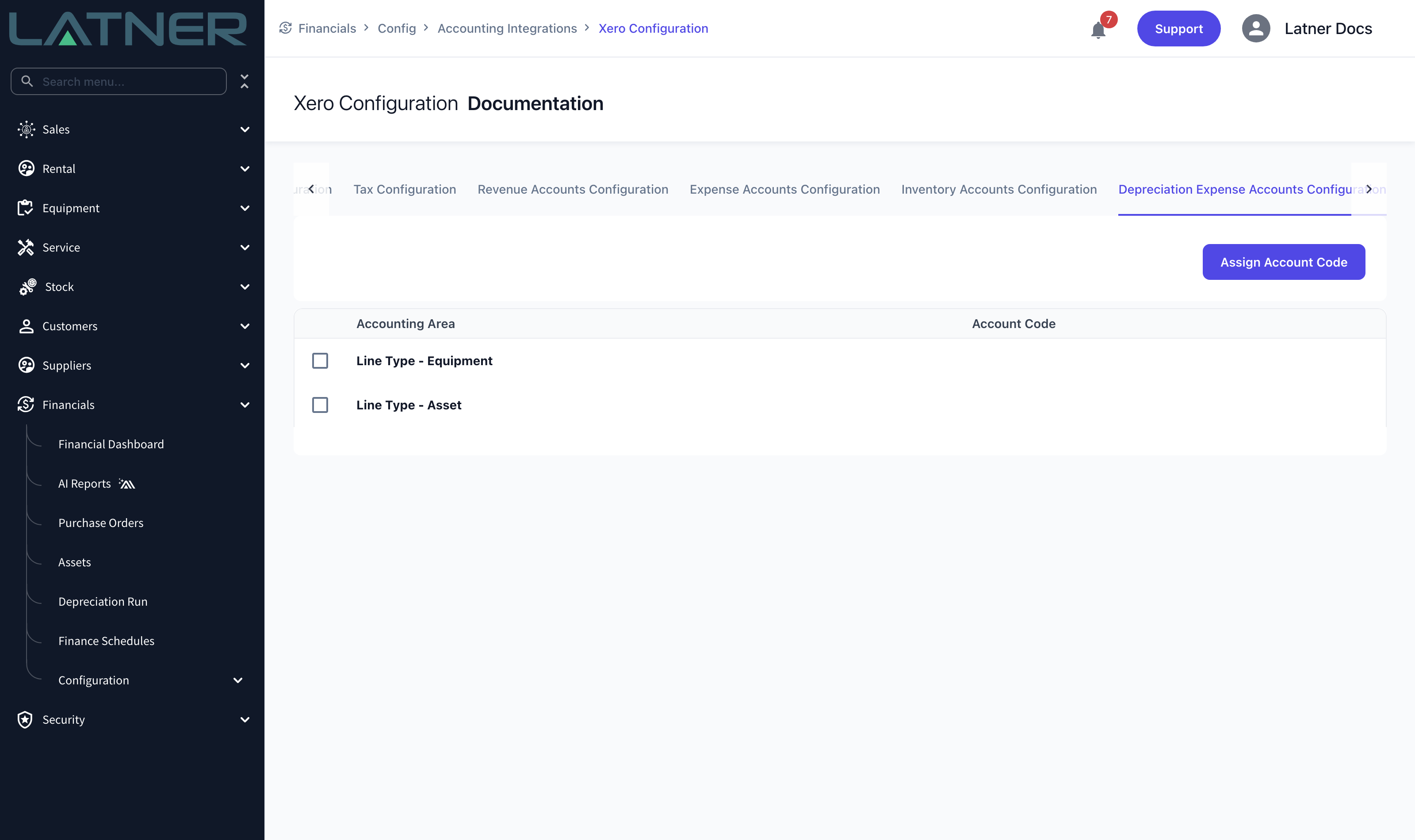
You can also assign codes at finer levels. Latner takes the most specific one that has been configured, in this order:
-
Equipment Model
-
Equipment Class
-
Equipment Category
-
Asset Group
-
Line Type - Equipment, if the line carries any equipment detail, otherwise Line Type - Asset
-
Line Type - Asset, as the final fallback
Branch-specific codes are available for the depreciation expense and accumulated depreciation accounts once Set Revenue/Expense Account Codes per Branch is enabled in Integration Settings. The at-cost account does not support branch overrides - it is the same account for every branch.
The three fixed accounts
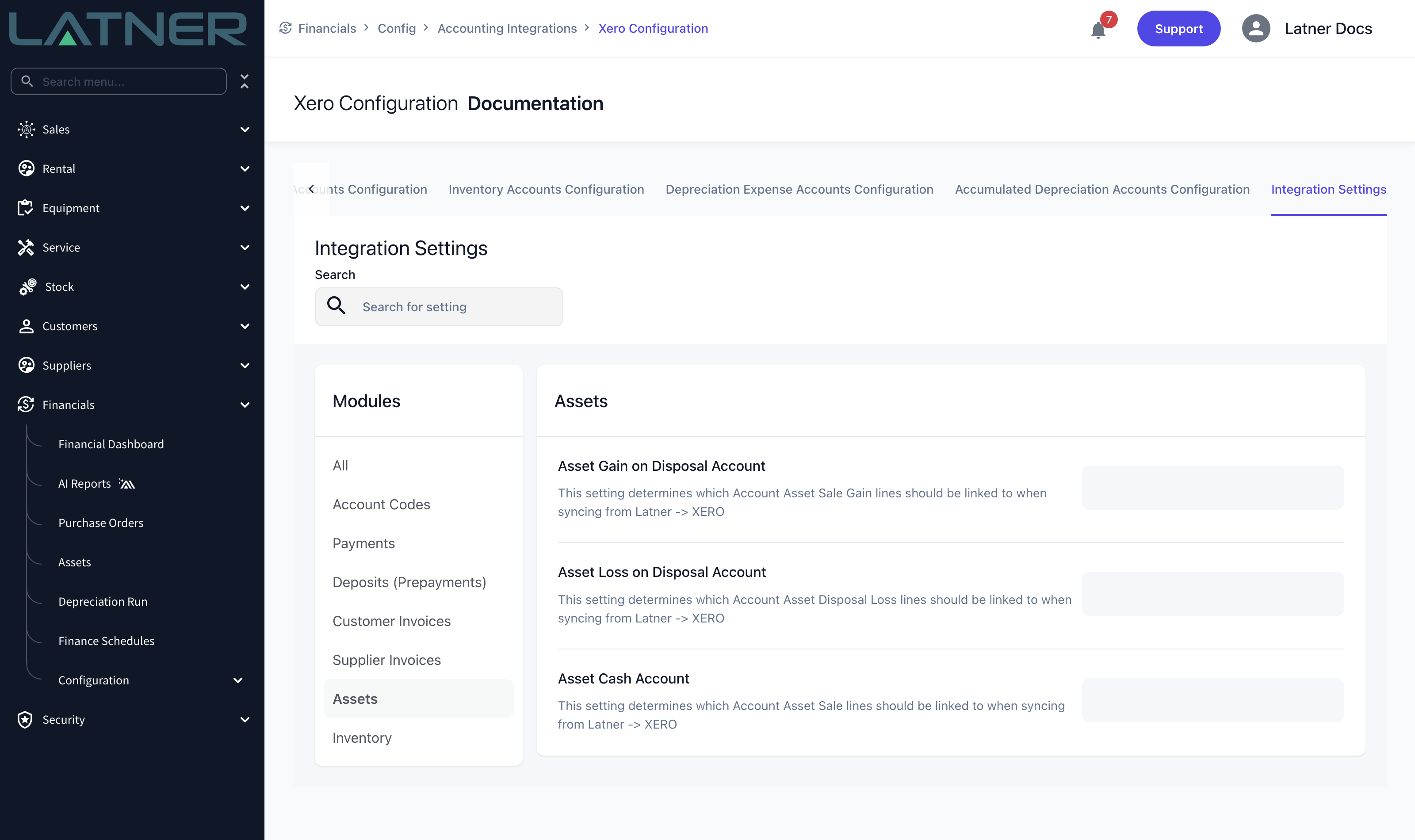
The remaining accounts are single settings, on the Integration Settings tab under the Assets module.
|
Setting |
Used for |
|---|---|
|
Asset Gain on Disposal Account |
The credit when a sale makes a gain. |
|
Asset Loss on Disposal Account |
The debit when a sale makes a loss, and every disposal write-off. |
|
Asset Cash Account |
The clearing account the sale proceeds are debited to. |
A missing or invalid account code is the most common reason a sync fails. The error comes straight back from your accounting system and is shown on the failed row of the Sync tab - fix the code here, then post again.
What each accounting system receives
|
Integration |
Document created |
|---|---|
|
Xero |
A single Manual Journal per run, created already posted rather than as a draft. |
|
MYOB |
A single General Journal per run, with each line explicitly marked as a debit or a credit. |
|
Sage Intacct |
A GL journal batch. Because Sage lines are stamped with an entity and location derived from the branch, a run covering branches in more than one Sage entity produces one batch per entity. |