
Asset Management and Depreciation gives you a fixed-asset register that sits alongside your equipment register, so the machines you hire out are also tracked as financial assets and depreciated month by month.
Overview
Your fleet has two lives. Out on site it is a scissor lift on a hire contract, and in the ledger it is a depreciating asset with a book value. Latner keeps both, and keeps them in step, so you do not maintain a separate spreadsheet of asset values.
-
Every depreciable thing is an Asset - a machine, a batch of bulk gear, or something with no equipment at all, such as an office fit-out.
-
Assets are depreciated monthly, on two independent books: an Account book that drives your journals, and a Tax book kept for reporting.
-
Depreciation can be calculated for a single asset at a time, or for your whole fleet in a Depreciation Run.
-
When equipment is sold, disposed or converted, the movement flows into the next depreciation run, which works out the book value at that date and the resulting gain or loss.
-
Posted depreciation is aggregated into a single journal per run and synced to your accounting system.
Before You Begin
The whole module is switched off until one global setting is enabled.
|
Requirement |
Where to Find It |
|---|---|
|
Activate Asset Management and Depreciation is switched on |
Security › Settings › Global › Financials |
|
The Assets permission |
Security › Configuration › Permission Groups › Financials › Screen |
|
The Asset Financial Details permission, to see purchase prices and book values |
Security › Configuration › Permission Groups › Financials › Field |
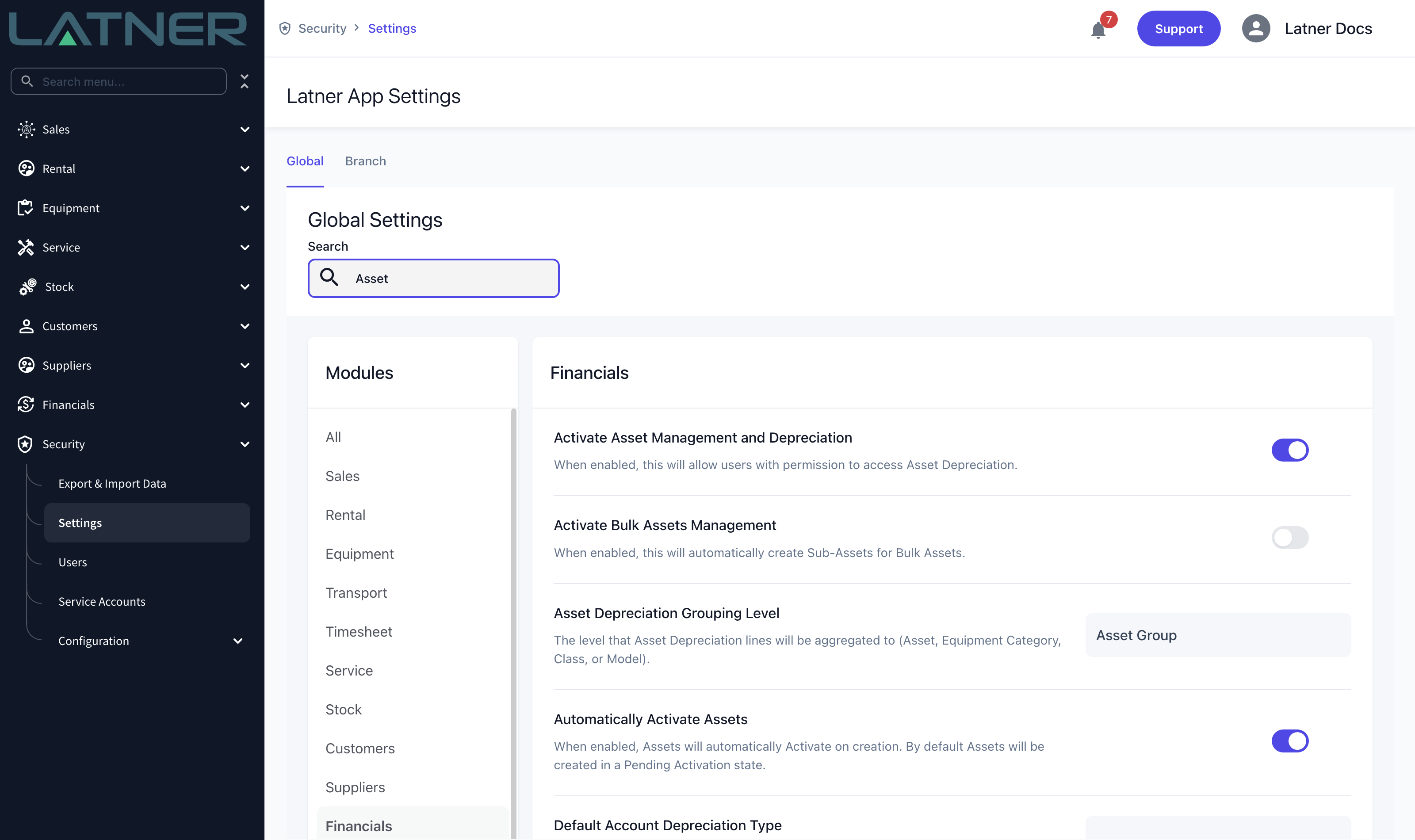
Until Activate Asset Management and Depreciation is on, the Assets and Depreciation Run menu items are hidden entirely, along with Asset Groups and Depreciation Types under Configuration. If a colleague can see them and you cannot, check your permission group before you go looking for the setting.
Where Assets Come From
You will rarely create an asset by hand for a machine you already own.
-
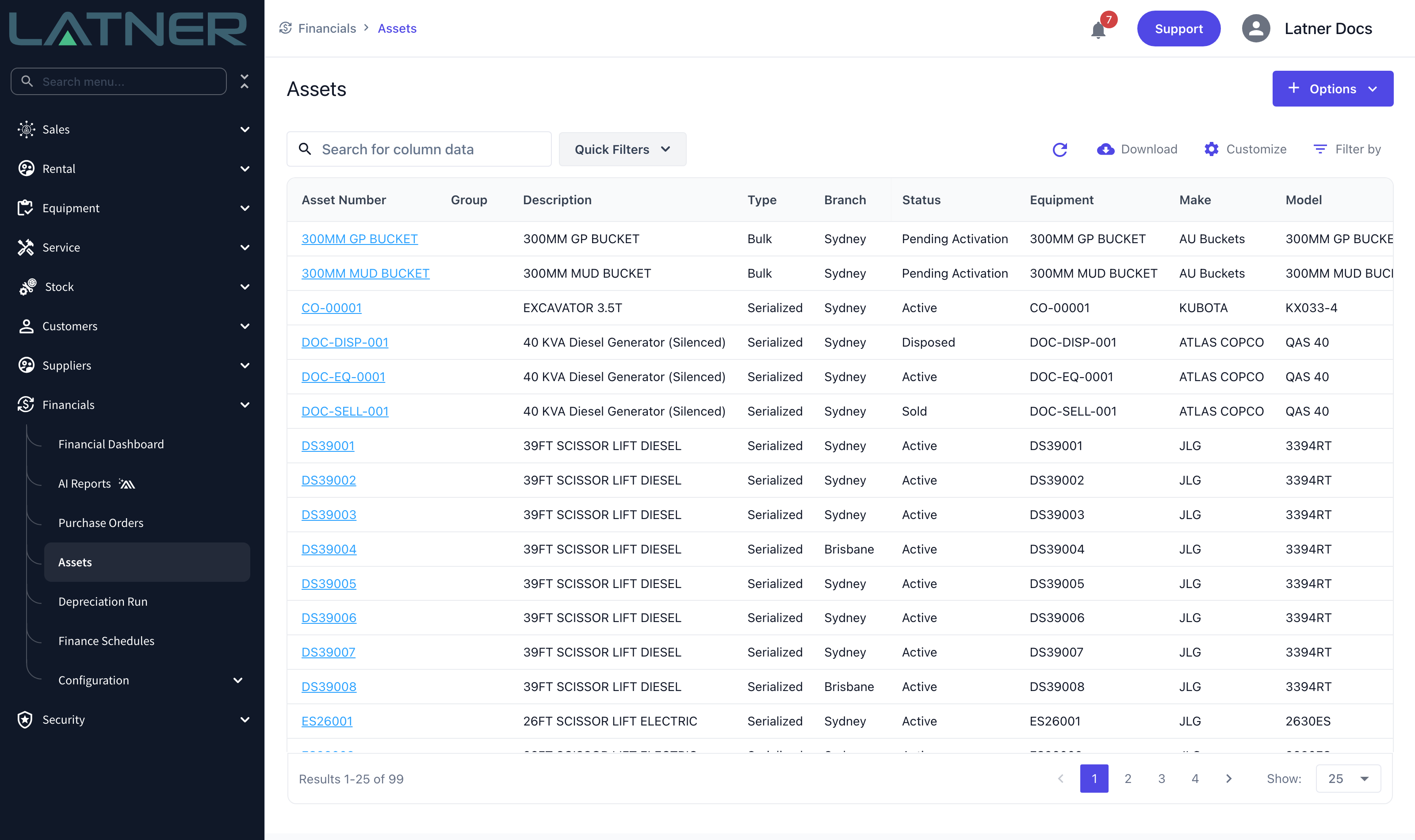
Creating equipment creates the asset for you. Latner copies across the equipment number, description, type, branch and, if you supplied them, the purchase date and price. Rename the equipment later and the asset number follows it.
-
It does not work the other way around. Creating an asset by hand does not create equipment, which is exactly what you want for things like an office fit-out or a workshop hoist that you never hire out.
-
An asset’s equipment link cannot be changed afterwards. If you attach the wrong equipment, the link has to be corrected on the equipment record, not the asset.
Serialized and Bulk Assets
Every asset is one of two types, and the type decides how quantity is handled.
|
Type |
How It Behaves |
|---|---|
|
Serialized |
One physical item, so the quantity is always 1. This is the usual case for a machine. Serialized assets can still have sub-assets, which represent capital improvements depreciated separately from the parent. |
|
Bulk |
A quantity of interchangeable items. A bulk asset has a header asset that acts as a container, plus one sub-asset per purchase batch. The values and the depreciation live on the sub-assets, not the header. |
Sub-assets only go one level deep - you cannot create a sub-asset of a sub-asset. On a bulk header asset the Purchase Details panel, Update Book Value and Calculate Depreciation are all hidden, because the header holds no value of its own.
The Two Depreciation Books
Each asset carries a matched pair of every depreciation field - one for the account book and one for the tax book. You will see them side by side on the asset record as Account Depreciation Type and Tax Depreciation Type, Account Book Value and Tax Book Value, and so on.
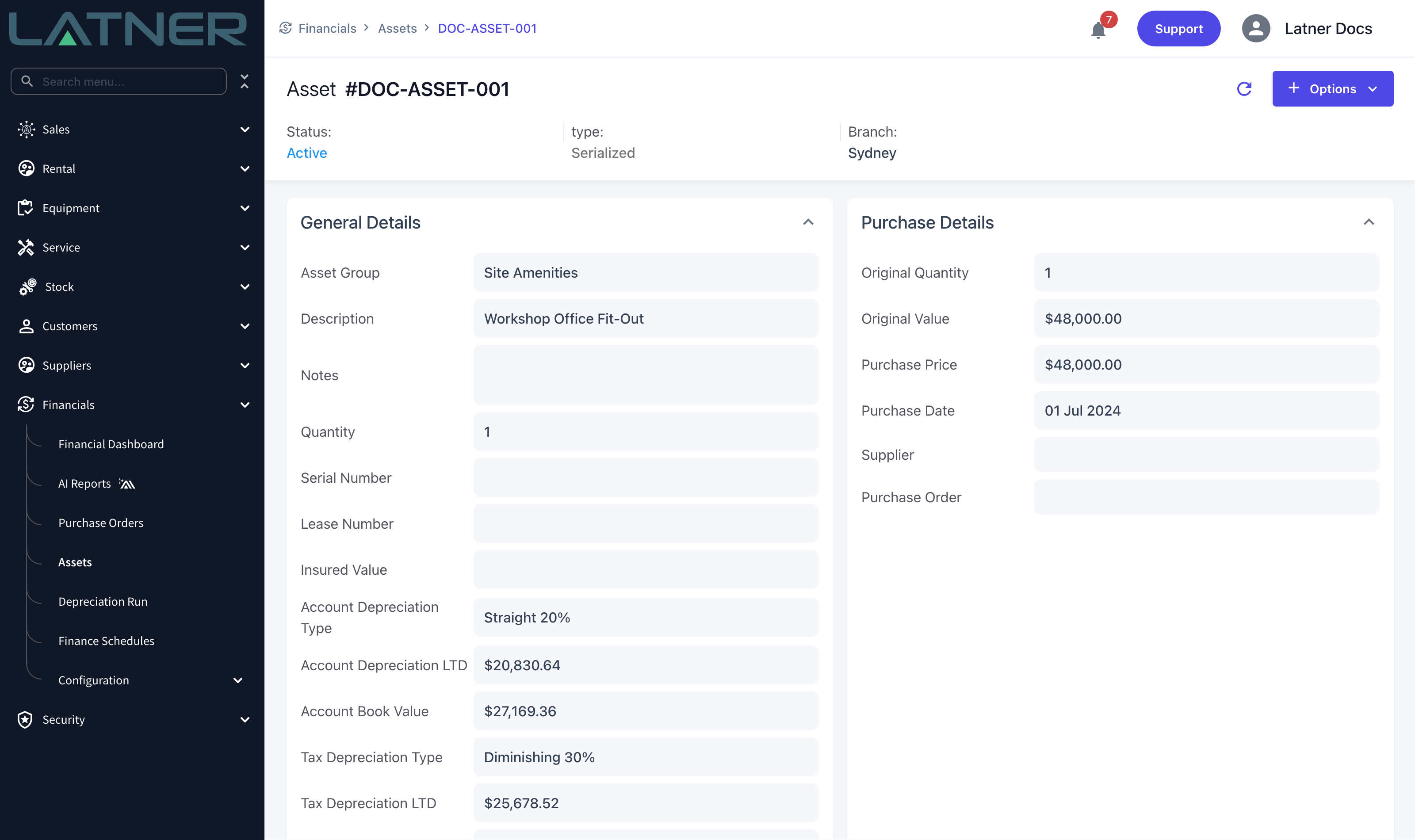
The tax book is never posted and never journalled. It exists so you can report on a second set of numbers; nothing on the tax side reaches your accounting system. Only the account book is posted and synced.
Asset Statuses
|
Status |
What It Means |
|---|---|
|
Pending Activation |
Created but not yet earning depreciation. This is the default for a new asset. |
|
Active |
Set up and depreciating. |
|
Inactive |
Manually deactivated. Inactive assets are skipped by depreciation. |
|
Disposed |
Set by Latner when the linked equipment is disposed of or scrapped. |
|
Sold |
Set by Latner when the linked equipment is sold. |
|
Converted |
Set by Latner when the linked equipment is converted into other equipment. |
Disposed, Sold and Converted are set for you by the equipment movement - you never pick them by hand. Assets in those three statuses keep depreciating in the next run, so the final part-month and the disposal line are both captured.
Where to Go Next
The pages below walk through the module in the order you would set it up.
FAQs
Watch the Demo
Prefer to watch it? Step through the same flow here.